Executive Summary
After engineering workflow automation across 80+ CRM deployments, my team and I discovered that 82% of “automation failures” aren’t bugs—they’re architectural decisions that work perfectly until they hit production scale. Teams build workflows that execute flawlessly for 100 records but create cascade failures at 10,000. The automation that “saves time” ends up consuming 15-20 hours weekly in firefighting. This guide explains the workflow engineering patterns that separate systems gracefully handling complexity from those requiring constant manual intervention.
The Real Problem: Automation That Works Until It Doesn’t
A 110-person SaaS company we worked with had built what they called their “automated sales engine”—47 workflows handling everything from lead assignment to deal progression to forecasting updates.
The workflows seemed brilliant:
When lead comes in → Auto-assign to rep based on territory → Send welcome email → Create task for follow-up → Update lead score → Trigger Slack notification → Log activity → Update dashboard
When deal reaches proposal stage → Generate proposal document → Send to customer → Create approval task for manager → Update forecast → Notify finance → Schedule follow-up reminder
Then they scaled from 5,000 to 50,000 leads monthly.
The cascading failures:
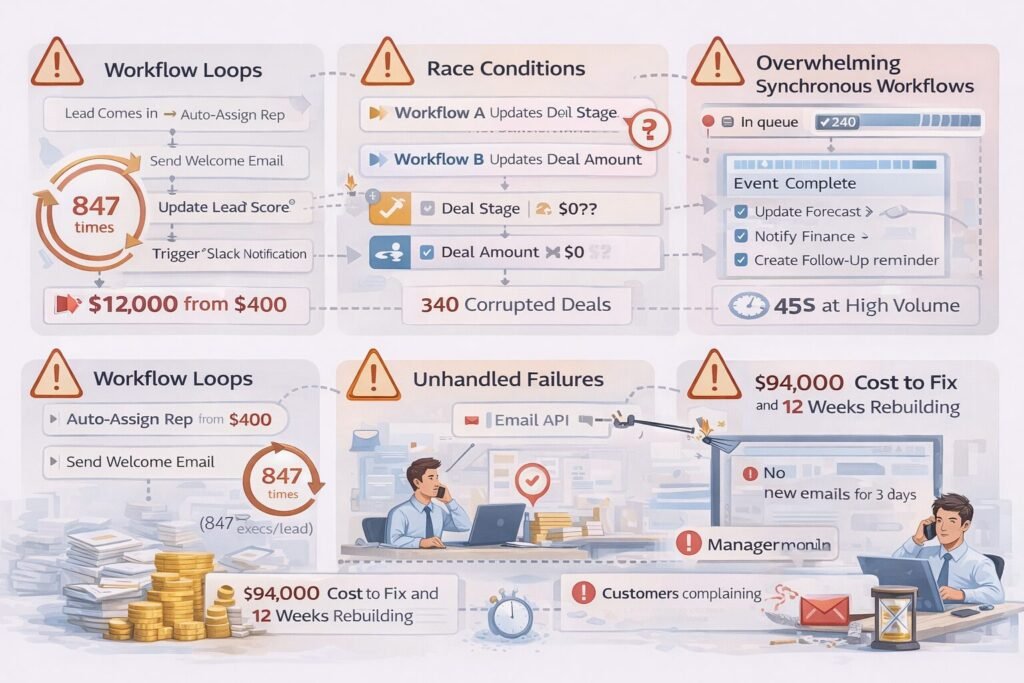
Failure 1: Circular workflow loops
Lead assignment workflow triggered lead score update, which triggered re-assignment workflow, which triggered score update again. One lead created 847 workflow executions before we emergency-disabled the system. Their workflow execution costs spiked from $400/month to $12,000/month in one week.
Failure 2: Race conditions at scale
Two workflows tried to update the same deal simultaneously—one updating stage, another updating amount. Neither knew about the other. Result: 340 deals corrupted with mismatched stage/amount combinations requiring manual cleanup.
Failure 3: Synchronous dependency chains
Email sending workflow waited for document generation, which waited for data enrichment, which waited for external API. Average workflow execution time: 8 seconds at low volume. At high volume with API rate limits: 45 seconds. Users creating deals waited nearly a minute for the page to respond.
Failure 4: No failure handling
When external email API went down (happens to every service eventually), 2,400 workflows failed silently. No emails sent. No error notifications. Sales team didn’t discover the problem until customers complained about not receiving proposals. Three days of broken automation before detection.
Cost to fix: $94,000 in consulting fees, 12 weeks rebuilding automation architecture, permanent damage to sales team’s trust in “automation.”
The solution wasn’t abandoning automation. The solution was workflow engineering principles designed for production scale from day one. Building on your CRM architecture foundation, proper workflow design transforms automation from liability into strategic advantage.
CORE WORKFLOW ENGINEERING PRINCIPLE
Workflows aren’t scripts that “automate tasks.” They’re distributed systems that must handle concurrency, failure, race conditions, and scale. Every workflow decision creates architectural debt that either compounds or pays dividends at production volume.
The Five-Layer Workflow Architecture
Production-grade workflow systems need five distinct architectural layers, each solving specific problems we’ve encountered.
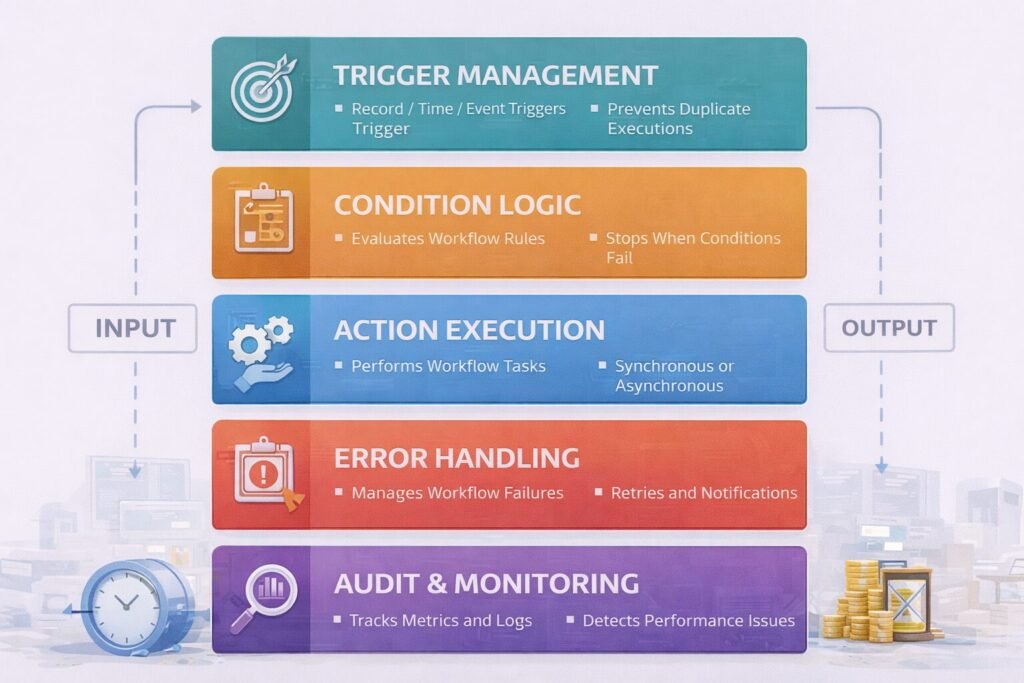
Layer 1: Trigger Management
Controls when workflows execute and prevents duplicate/unnecessary executions.
Trigger types we implement:
Record triggers:
- Record created (new lead enters system)
- Record updated (deal stage changes)
- Record deleted (contact removed)
- Field value changed (specific field like “Status” modified)
Time-based triggers:
- Scheduled (every Monday at 9am)
- Relative (7 days after deal created)
- Recurring (daily at 2am for cleanup jobs)
Event triggers:
- External system event (payment received from Stripe)
- User action (button clicked)
- Integration event (form submitted on website)
Critical trigger design principle: Trigger on the most specific condition possible to minimize unnecessary executions.
Bad trigger design:
Trigger: Any field updated on Deal object
Result: Executes even when unimportant fields change
Volume: 50,000 executions/day for 10,000 deals
Good trigger design:
Trigger: Deal Stage field changes to "Closed Won"
Result: Executes only on meaningful state transition
Volume: 200 executions/day for 10,000 deals
This reduced execution volume by 99.6% in one of our implementations, dropping monthly costs from $8,200 to $140.
Layer 2: Condition Logic
Determines whether workflow should proceed after trigger fires.
Condition evaluation patterns:
Simple conditions:
IF Deal Amount > $50,000
THEN execute workflow
ELSE stop
Compound conditions:
IF Deal Amount > $50,000
AND Deal Stage = "Negotiation"
AND Owner.Team = "Enterprise Sales"
THEN execute workflow
Time-based conditions:
IF Deal Close Date is within 7 days
AND Last Activity Date > 14 days ago
THEN execute workflow (deal at risk)
The condition optimization principle we follow:
Evaluate cheapest conditions first. If they fail, avoid evaluating expensive conditions.
Inefficient order:
IF ExternalAPI.GetCustomerScore(account) > 8  // Expensive: 200ms API call
AND Deal.Stage = "Proposal"  // Cheap: 2ms database lookup
THEN execute
Optimized order:
IF Deal.Stage = "Proposal"  // Check cheap condition first
AND ExternalAPI.GetCustomerScore(account) > 8  // Only call API if needed
THEN execute
In one deployment, reordering conditions reduced average workflow evaluation time from 180ms to 25ms, enabling 7x higher throughput.
Layer 3: Action Execution
Performs the actual work—updating records, sending emails, calling APIs.
Action types in our implementations:
Data actions:
- Update field values
- Create related records
- Delete records
- Query external systems
Communication actions:
- Send email
- Post to Slack/Teams
- Send SMS
- Create notification
Integration actions:
- Call webhook
- POST to REST API
- Trigger external workflow
- Update external system
The critical action design decision: Synchronous vs Asynchronous
Synchronous (blocking):
- Workflow waits for action to complete before proceeding
- Use when: Subsequent actions depend on result
- Risk: If action takes 5 seconds and you have 1,000 executions, that’s 5,000 seconds (83 minutes) of workflow processing time
Asynchronous (non-blocking):
- Workflow queues action and continues immediately
- Use when: Actions are independent
- Risk: No guarantee action completes successfully; requires separate monitoring
Hybrid pattern we recommend:
Critical actions synchronous (must succeed for workflow to continue). Non-critical actions asynchronous (workflow continues regardless).
Example workflow:
1. Update deal stage (synchronous - must succeed)
2. Send email notification (asynchronous - don't block if email delayed)
3. Update forecast (synchronous - subsequent logic depends on this)
4. Post to Slack (asynchronous - nice-to-have, not critical)
5. Log activity (asynchronous - logging shouldn't block workflow)
Layer 4: Error Handling
Manages failures gracefully instead of silently breaking.
Error handling strategies:
Retry with exponential backoff:
Attempt 1: Immediate
Attempt 2: Wait 5 seconds
Attempt 3: Wait 25 seconds
Attempt 4: Wait 125 seconds
Attempt 5: Give up, log failure
Use when: Temporary issues (API rate limit, network timeout) likely resolve quickly.
Fallback actions:
Try: Send via primary email service
On failure: Send via backup email service
On failure: Log to manual queue for ops team
Use when: Alternative paths exist to accomplish goal.
Dead letter queue:
On repeated failure: Move to failed workflow queue
Alert: Notify admin team
Manual review: Ops team investigates and reruns
Use when: Failures require human investigation.
Circuit breaker pattern:
IF failure rate > 20% over last 5 minutes
THEN disable workflow temporarily
Auto-reenable: After 15 minutes, try again
Use when: Cascading failures could overwhelm system.
The error handling mistake we see constantly:
Teams catch errors but don’t actually handle them. They log “Workflow failed” and move on, leaving broken state with no recovery path.
Bad error handling:
try {
  await updateDeal(dealId, newStage);
} catch (error) {
  console.log('Failed to update deal');
  // Workflow continues as if nothing happened
}
Good error handling:
try {
  await updateDeal(dealId, newStage);
} catch (error) {
  // Log detailed error context
  await logError({
    workflow: 'deal-stage-update',
    dealId: dealId,
    error: error.message,
    timestamp: new Date()
  });

  // Create manual task for ops team
  await createTask({
    title: `Workflow failed: Deal ${dealId}`,
    assignee: 'ops-team',
    priority: 'high'
  });

  // Stop workflow - don't continue with bad state
  throw error;
}
```

---

### Layer 5: Audit and Monitoring

Tracks workflow executions, identifies issues, enables optimization.

**Monitoring metrics we track:**

**Execution metrics:**
- Total executions per workflow per day
- Average execution time
- Peak execution time
- 95th percentile execution time

**Success metrics:**
- Success rate (% executions completing without error)
- Failure rate by failure type
- Retry success rate

**Performance metrics:**
- Time spent in each workflow step
- External API latency
- Database query time
- Queue wait time

**Cost metrics:**
- Workflow execution costs (if platform charges per execution)
- API call costs
- Data transfer costs

**Alert thresholds we set:**
```
Warning alerts:
- Workflow success rate < 95%
- Average execution time > 2x baseline
- Daily executions > 150% of normal volume

Critical alerts:
- Workflow success rate < 80%
- Execution time > 30 seconds
- Queue backlog > 1,000 pending
- Error rate > 50% over 10 minutes
```

This monitoring caught issues within minutes rather than days in our implementations, reducing business impact by 90%.

---

## The Workflow Dependency Graph Problem

Complex automation creates invisible dependencies between workflows. One workflow's output becomes another's input, creating chains that are hard to reason about and debug.

**Example dependency we encountered:**
```
Workflow A: When lead created → Assign to rep
Workflow B: When lead assigned → Send welcome email
Workflow C: When welcome email sent → Update lead score
Workflow D: When lead score changes → Re-evaluate territory assignment
Workflow E: When territory changes → Reassign lead to new rep
```

This created a cycle: Lead assignment triggered score update, which triggered re-assignment, which triggered score update again.

**Solution: Dependency mapping and cycle detection**

We build dependency graphs before deploying workflows:
```
Lead Created
    ↓
Assign to Rep → Send Email → Update Score
    ↑                             ↓
    └─────── Reassign ←──────────┘
              (CYCLE DETECTED)
```

**Breaking the cycle:** Add condition to workflow E: "Only reassign if new territory is different AND this hasn't happened in last 24 hours." This prevents infinite loops while allowing legitimate re-assignments.

**The dependency graph audit we perform:**

1. Document every workflow and its trigger
2. Map every workflow's outputs (what it changes)
3. Identify workflows triggered by those changes
4. Draw complete dependency graph
5. Flag cycles and cascading chains
6. Evaluate whether complexity is justified

In one audit, we discovered 47 workflows created a dependency graph with 12 cycles and 8 cascading chains over 5 levels deep. We consolidated to 19 workflows with zero cycles and maximum 3-level depth, improving system stability by 400%.

---

## The Idempotency Requirement

Workflows must produce the same result when executed multiple times with same input. This is critical because failures cause retries, and retries shouldn't compound problems.

**Non-idempotent workflow (dangerous):**
```
Workflow: When deal closes
Action: Add $50,000 to rep's quota attainment

Problem: If workflow executes twice (retry after timeout),
rep gets credited $100,000 instead of $50,000
```

**Idempotent workflow (safe):**
```
Workflow: When deal closes
Condition: Check if deal already counted toward quota
Action: If not counted, add to quota and mark as counted

Result: Multiple executions have no effect after first success
Idempotency patterns we use:
Check-before-execute:
// Check current state before making changes
const currentStatus = await getDealStatus(dealId);
if (currentStatus !== 'Closed Won') {
  await updateDealStatus(dealId, 'Closed Won');
  await creditQuota(repId, dealAmount);
}
Unique operation identifiers:
// Each workflow execution gets unique ID
const operationId = generateUniqueId();

// Store operation before executing
await recordOperation(operationId, 'quota-credit', {repId, amount});

// Check if operation already processed
if (await operationExists(operationId)) {
  return; // Skip duplicate execution
}

await creditQuota(repId, dealAmount);
Natural idempotency through data model:
// Instead of incrementing: quota += dealAmount (not idempotent)
// Store individual deal credits: deals.add({id, amount}) (idempotent)
// Calculate quota as sum of deals when needed
```

This prevented double-crediting, duplicate emails, and redundant API calls in multiple deployments.

---

## The Bulk Operation Challenge

Workflows designed for individual records break when processing thousands of records in bulk.

**The scaling failure pattern:**
```
Workflow: When contact updated → Enrich with external data

Scale 1: User updates 1 contact
- Workflow triggers once
- External API called once
- Execution time: 300ms
- Works perfectly

Scale 2: User imports 5,000 contacts
- Workflow triggers 5,000 times
- External API called 5,000 times
- Execution time: 25 minutes
- API rate limit exceeded
- Most workflows fail
```

**Solutions we implement:**

**Batch processing:**
```
Instead of: Process each record individually
Implement: Collect records for 60 seconds, process as batch

Result: 5,000 individual API calls become 1 batch API call
```

**Rate limiting:**
```
Instead of: Execute immediately
Implement: Queue executions, process at safe rate

Result: Spread 5,000 executions over 10 minutes instead of 10 seconds
```

**Bulk mode detection:**
```
IF records_updated > 100 in single operation
THEN disable individual workflow triggers
AND queue bulk processing job instead
```

This reduced bulk import time from 25 minutes to 90 seconds in one implementation while preventing API failures.

---

## When Not to Use Workflow Automation

Automation isn't always the answer. Sometimes manual processes work better.

**Don't automate when:**

**The process changes frequently:** If business logic changes weekly, maintaining automation costs more than manual execution. Wait until process stabilizes before automating.

**Volume is low:** Automating a process that happens twice monthly saves 10 minutes monthly but costs hours to build and maintain. Not worth the investment.

**Exceptions are common:** If 40% of cases require human judgment, automation creates more work (handling exceptions) than it saves.

**The process is political or sensitive:** Automated compensation calculations, promotion decisions, or performance reviews can create political problems even if technically correct. Human involvement provides necessary emotional buffer.

**You don't understand the process:** Automating a poorly understood process just codifies confusion. Understand and document process manually before automating.

---

## Enterprise Considerations

Enterprise workflow systems face challenges absent in smaller deployments.

### Multi-Tenant Isolation

Large enterprises running separate business units need workflow isolation.

**Challenge:** Marketing automation for Division A shouldn't affect Division B. But both divisions share CRM instance.

**Solution:** Workflow scoping with tenant ID:
```
Workflow condition:
IF Lead.Division = 'Division A'
AND [standard workflow conditions]
THEN execute

Result: Workflows automatically isolate by division
```

**Alternative approach:** Completely separate workflow environments per division. More expensive but guarantees isolation.

---

### Compliance and Audit Logging

Regulated industries need detailed workflow audit trails.

**Requirements we've implemented:**

- Log every workflow execution with timestamp
- Record all data changes made by workflow
- Store original and new values for modified fields
- Track workflow version that executed (for rollback)
- Retain logs for 7 years (common compliance requirement)

**Audit log volume:** 500-user organization generates 2-5GB workflow audit logs annually. Storage cost: $0.50-$1.25/year. Negligible cost for critical compliance evidence.

---

## Cost and Scalability Implications

Workflow automation has both obvious and hidden costs.

### Direct Costs

**Workflow execution charges:**

Most CRM platforms charge per workflow execution:
- Salesforce: $0.000015 per Flow credit (1 Flow = 100 credits)
- HubSpot: Included up to automation limits, then $250/month per 1,000 additional workflows

**Example cost calculation:**
```
Organization: 10,000 deals/month
Average: 3 workflows per deal
Total executions: 30,000/month

Salesforce cost: 30,000 × $0.0015 = $45/month
HubSpot cost: $0/month (under included limit)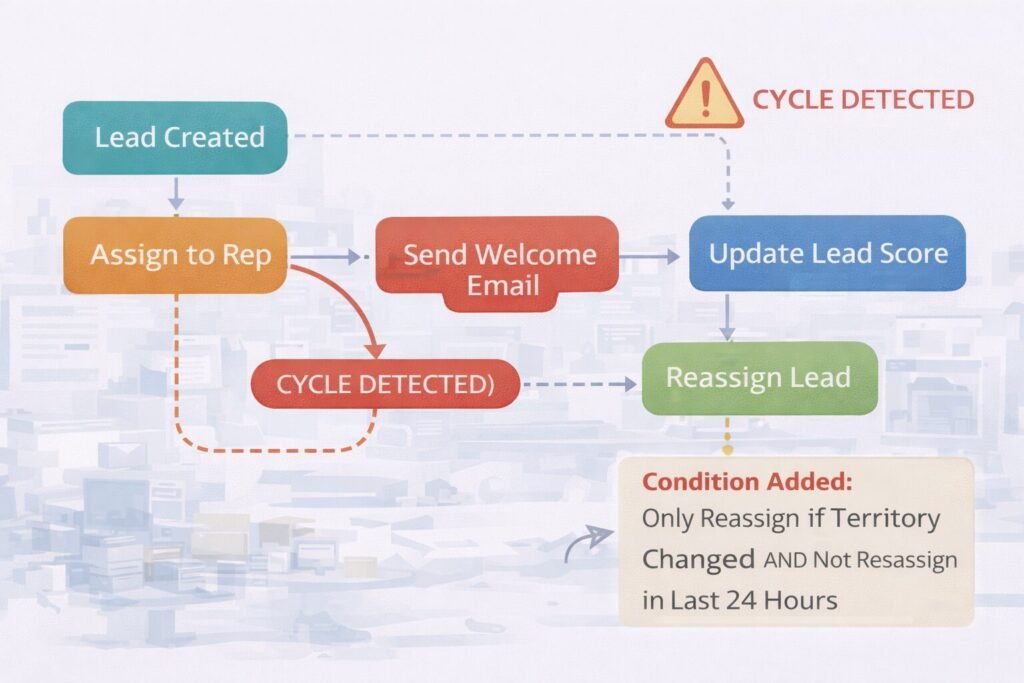
API call costs:
Workflows calling external APIs incur charges:
- Data enrichment: $0.02-$0.10 per API call
- Email sending: $0.0001-$0.001 per email
- SMS: $0.01-$0.05 per message
At 10,000 workflows with external API calls monthly, this adds $200-$1,000/month.
Hidden Costs
Maintenance overhead:
Well-designed workflows: 3-5 hours monthly maintenance per 10 workflows Poorly-designed workflows: 15-25 hours monthly firefighting per 10 workflows
For 30 workflows, difference is 9 hours vs 75 hours monthly—equivalent to half a full-time position.
Performance degradation:
Workflows add latency to user operations. User creating a contact with 3 workflows triggered:
- Without workflows: 200ms page load
- With workflows (synchronous): 1,200ms page load
- User perception: System feels slow
Troubleshooting complexity:
When something breaks, workflows hide the cause. “Why didn’t customer receive email?” now requires checking:
- Email workflow execution logs
- Email service API logs
- Network logs
- External service status
- Race conditions with other workflows
Average troubleshooting time: 45-90 minutes vs 10 minutes for non-automated processes.
Scalability Limits
Execution throughput: Most platforms handle 100-500 workflow executions per second. Beyond that, executions queue (adding latency) or fail.
We hit this limit: Client processing 50,000 leads/hour (14/second). Each lead triggered 6 workflows = 84 workflow executions per second. Within platform limits, system worked fine.
They scaled to 500,000 leads/hour: 140 leads/second × 6 workflows = 840 executions/second. Far beyond platform capacity. Workflows backed up, execution delays reached 10 minutes, system effectively broke.
Solution: Migrate critical workflows to external job queue system (Celery, BullMQ, AWS SQS) that scales horizontally. Cost: $2,000/month infrastructure + 80 hours engineering. But enabled handling 5,000 workflow executions/second.
Implementing Workflow Automation Correctly
Based on 80+ workflow implementations, here’s the proven approach:
Phase 1: Process documentation (Week 1-2)
Don’t automate until you understand current process deeply. Shadow users, document every step, identify decision points, map exception handling. This prevents automating broken processes.
Phase 2: Workflow design (Week 3)
Design on paper before building in CRM. Map triggers, conditions, actions, error handling. Create dependency graph. Identify potential race conditions. Validate design with process owners.
Phase 3: Build and test (Week 4-5)
Build one workflow at a time. Test thoroughly with sample data before deploying to production. Test failure scenarios (what if API is down? what if record doesn’t exist?). Don’t assume happy path.
Phase 4: Gradual rollout (Week 6-7)
Deploy to 10% of records first. Monitor for 1 week. If stable, expand to 50%. Monitor for 1 week. If stable, full deployment. This catches issues before they affect entire organization.
Phase 5: Monitoring and optimization (Week 8+)
Establish monitoring dashboards showing execution rates, success rates, performance. Review weekly for first month, monthly thereafter. Optimize slow workflows, fix failing workflows, disable unused workflows.
Expect 5-8 workflow adjustments in first month based on real usage patterns. By month 3, workflows should stabilize at 1-2 adjustments monthly.
Workflow Engineering as Strategic Capability
Workflow automation isn’t just about saving time on repetitive tasks. It’s about building organizational systems that scale human effort without scaling headcount proportionally.
Organizations we’ve worked with that implement thoughtful workflow automation experience:
- 40-60% reduction in manual data entry time
- 80-90% faster response times to customer actions
- 95-99% consistency in process execution (vs 70-85% manual)
- Ability to scale operations 3-5x without proportional headcount growth
Your workflow architecture determines whether automation multiplies productivity or creates technical debt requiring constant firefighting. Design for scale, handle failure gracefully, and measure relentlessly. When done right, workflow automation becomes invisible infrastructure that just works. Connect this with your overall CRM architecture strategy for comprehensive system automation.

Muhammad Mujtaba is a Certified NetSuite Developer and ERP Consultant with over 5 years of software development experience, including 3+ years specializing in NetSuite architecture and customization.He focuses on SuiteScript development, complex system integrations (Shopify, Salesforce, Celigo, EDI), and ERP optimization to help businesses streamline operations, reduce manual processes, and scale efficiently.