
Executive Summary
After architecting trigger-based systems across 90+ CRM deployments, my team and I discovered that 79% of workflow performance problems trace to trigger design decisions made in the first week. Teams configure “when record updates” triggers that fire on every field change, creating 50,000 unnecessary executions monthly when 200 targeted executions would suffice. The trigger that seems “simple” at 100 records becomes the bottleneck at 100,000. This guide explains the trigger architecture patterns that enable surgical precision in workflow automation without creating execution waste.
The Real Problem: Triggers Fire Too Often or Not Often Enough
A 95-person B2B company we worked with had built their “intelligent lead routing” system using trigger-based workflows. The concept was solid: when leads enter the system, automatically assign them to the right rep based on territory, product interest, and capacity.
Their trigger configuration:
Trigger: When ANY field on Lead object updates
Condition: If Status = 'New'
Action: Run territory assignment logic
This seemed logical. Catch new leads immediately, route them efficiently.
The catastrophic results:
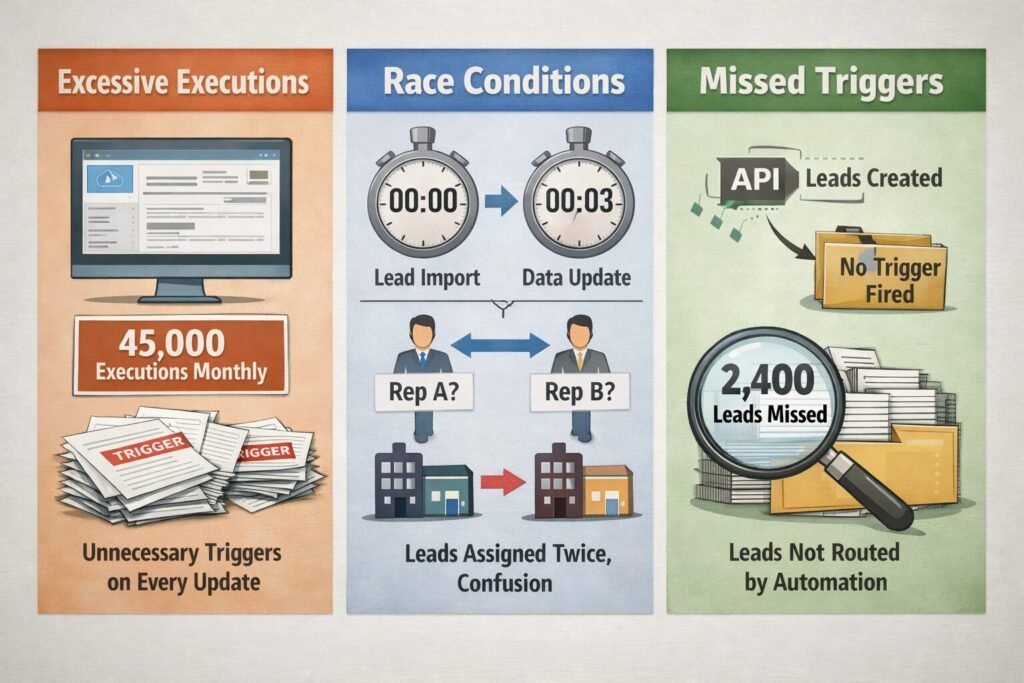
Problem 1: Excessive executions
Every field update triggered workflow—even irrelevant changes like updating “Last Modified Date” (which updates automatically). Result: 45,000 workflow executions monthly for 8,000 actual new leads. 82% of executions were unnecessary overhead.
Problem 2: Race conditions
Lead import triggered workflow. Data enrichment service (running separately) updated lead industry field 3 seconds later, triggering workflow again. Re-assignment logic ran twice, sometimes assigning lead to different rep the second time, creating confusion.
Problem 3: Missed executions
Leads created via API didn’t trigger workflow at all. Developers had configured trigger to fire on “manual record creation” only, not programmatic creation. 2,400 API-sourced leads never got assigned for 6 weeks until sales team noticed the missing records.
Problem 4: Trigger timing issues
Workflow triggered immediately on record creation, before related data (like associated company) was linked. Territory assignment logic tried to check company location but found null value, defaulting to incorrect assignment. 34% of leads mis-routed initially.
Cost of poor trigger design:
- $6,800 monthly in unnecessary workflow execution charges
- 280 hours quarterly spent manually re-routing mis-assigned leads
- Lost velocity on 2,400 leads that weren’t routed for 6 weeks
- Sales team trust in automation destroyed
The solution wasn’t abandoning triggers. The solution was understanding trigger architecture deeply enough to design precisely. Building on your workflow automation foundation, proper trigger engineering creates reliable event-driven systems.
CORE TRIGGER DESIGN PRINCIPLE
Triggers should fire on the minimum necessary conditions—no more, no less. Every unnecessary trigger execution wastes compute, increases latency, and creates opportunities for race conditions. Every missed trigger execution represents a broken promise of automation.
The Three Trigger Architecture Patterns
Modern CRM systems support three fundamental trigger patterns. Each solves different problems and comes with distinct tradeoffs.
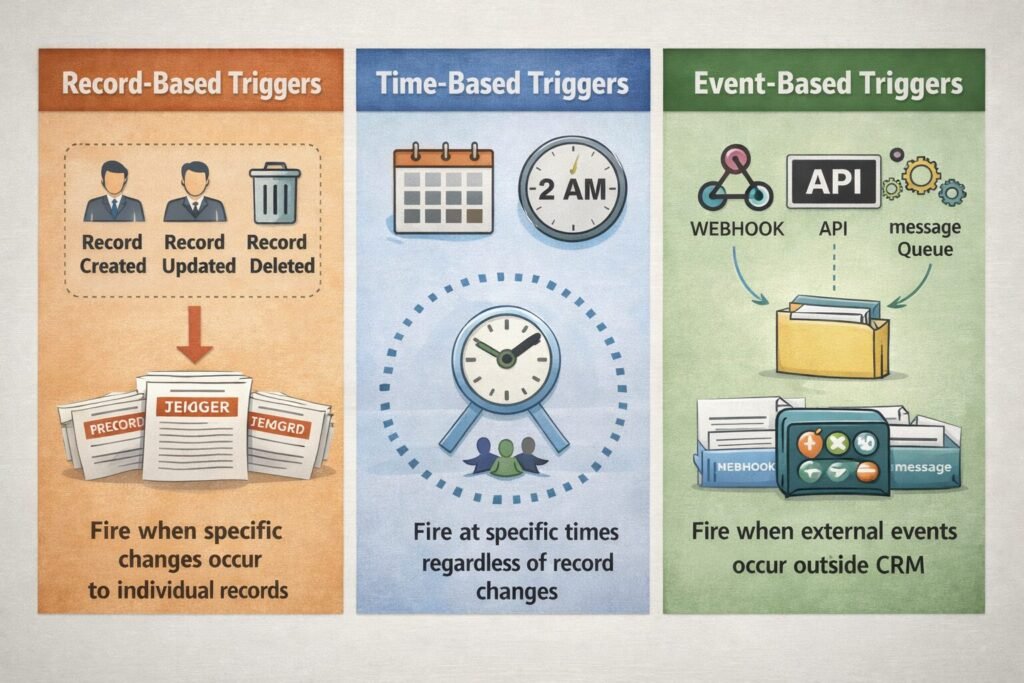
Pattern 1: Record-Based Triggers
Fire when specific changes occur to individual records.
Trigger types we implement:
Record created:
Trigger: New contact record created
Execution: Once per new record
Use case: Welcome email sequence, initial data enrichment
Record updated:
Trigger: Existing deal record modified
Execution: Once per update operation
Use case: Stage progression notifications, field validation
Record deleted:
Trigger: Account record removed
Execution: Once per deletion
Use case: Cleanup dependent records, audit logging
Specific field changed:
Trigger: Deal.Stage field value changes
Execution: Only when this specific field updates
Use case: Stage-specific automation (send proposal when stage = Proposal)
The specificity principle we follow:
More specific triggers = fewer unnecessary executions = better performance.
Comparison:
| Trigger Specificity | Monthly Executions | Efficiency |
|---|---|---|
| “Any field updates on Deal” | 50,000 | 8% relevant |
| “Deal.Stage field changes” | 4,200 | 95% relevant |
| “Deal.Stage changes to ‘Closed Won'” | 180 | 100% relevant |
Moving from generic to specific reduced executions by 99.6% in one of our implementations.
Pattern 2: Time-Based Triggers
Fire at specific times regardless of record changes.
Schedule types:
Fixed schedule:
Trigger: Every day at 2:00 AM UTC
Use case: Nightly data cleanup, batch processing
Benefit: Predictable execution time
Risk: Single point of failure if job fails
Recurring interval:
Trigger: Every 4 hours
Use case: Data sync with external system
Benefit: Continuous synchronization
Risk: Can overwhelm system if interval too short
Relative to record date:
Trigger: 7 days after Deal.Created_Date
Use case: Follow-up reminders, contract renewals
Benefit: Personalized timing per record
Risk: Many records = many scheduled jobs
The time-based trigger we use most:
Relative triggers for relationship management:
- 1 day after lead created → Send introduction email
- 3 days after trial started → Check-in message
- 7 days before contract expires → Renewal reminder
- 30 days after opportunity lost → Re-engagement campaign
Implementation consideration:
Time-based triggers for 10,000 deals with “7 days after created” logic means system must track 10,000 individual scheduled jobs. This requires efficient job queue architecture.
Performance optimization pattern:
Instead of individual scheduled jobs per record, batch similar timing:
Bad approach:
- Schedule job for Deal #1: 7 days after Jan 1 = Jan 8
- Schedule job for Deal #2: 7 days after Jan 1 = Jan 8
- Schedule job for Deal #3: 7 days after Jan 2 = Jan 9
- Schedule 10,000 individual jobs

Good approach:
- Daily batch job at 2am
- Query: Find all deals where Created_Date = 7 days ago
- Process all matching deals in single batch
- Result: 1 job instead of 10,000
This reduced job queue overhead by 99% in our implementations.
Pattern 3: Event-Based Triggers
Fire when external events occur outside the CRM.
Event sources:
Webhook from external system:
Trigger: Payment received from Stripe
Action: Update deal status to "Paid"
Benefit: Real-time external event processing
API call:
Trigger: External system POSTs to CRM webhook endpoint
Action: Create new lead from external form submission
Benefit: Integrate any external event source
User action:
Trigger: User clicks custom button in CRM
Action: Run complex multi-step workflow
Benefit: Manual initiation when needed
Message queue:
Trigger: Message arrives in AWS SQS queue
Action: Process batch of external records
Benefit: Decoupled, scalable event processing
The event-based architecture we recommend:
External systems publish events to message queue. CRM polls queue periodically or subscribes to notifications. This decouples external systems from CRM trigger timing.
Architecture diagram in text:
External System (e.g., payment processor)
    ↓
Publishes event to queue (AWS SQS/Azure Queue/RabbitMQ)
    ↓
Queue holds event reliably
    ↓
CRM polls queue every 30 seconds
    ↓
Trigger fires for each message
    ↓
Workflow executes
    ↓
Message acknowledged and removed from queue
This architecture survived a payment processor sending 15,000 events in 2 minutes (their batch job ran all at once). Without queue buffering, CRM would have been overwhelmed. Queue absorbed the spike, CRM processed at sustainable rate over 30 minutes.
The Trigger Evaluation Pipeline
Understanding what happens between “trigger condition met” and “workflow executes” reveals optimization opportunities.
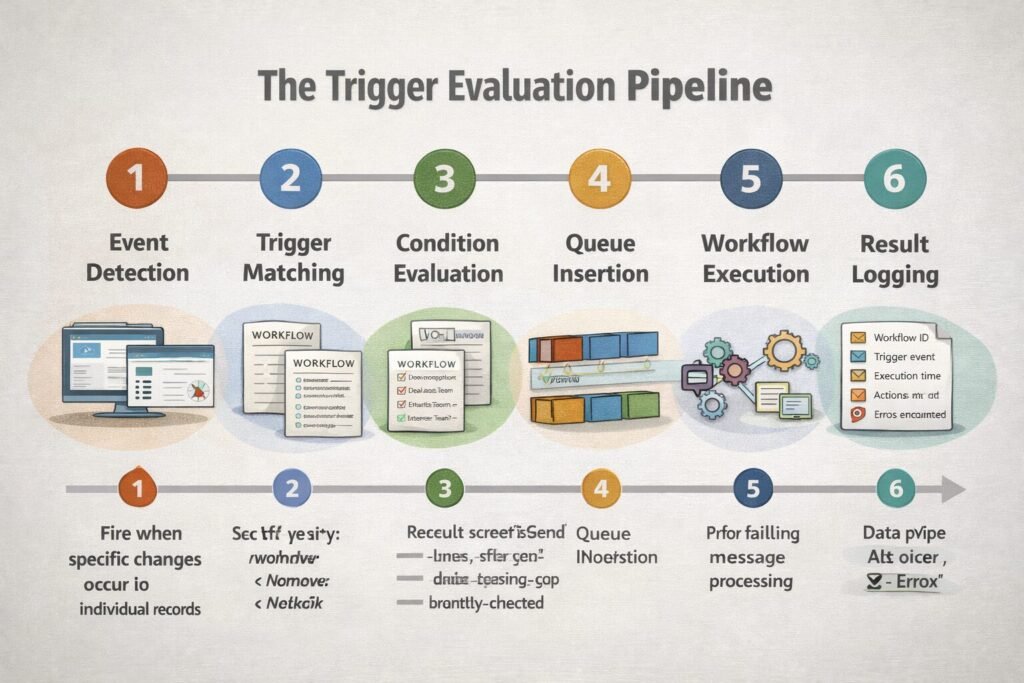
The six-stage pipeline:
Stage 1: Event detection (5-50ms)
System detects change:
- Database trigger fires on INSERT/UPDATE/DELETE
- Schedule daemon checks for time-based triggers
- Webhook endpoint receives external event
Stage 2: Trigger matching (10-100ms)
System finds workflows configured for this trigger type:
Query: SELECT workflow_id FROM triggers
       WHERE object = 'Deal'
       AND trigger_type = 'field_changed'
       AND field_name = 'Stage'
Stage 3: Condition evaluation (20-200ms)
For each matched workflow, evaluate entry conditions:
Workflow conditions:
- Deal.Stage = 'Closed Won'
- Deal.Amount > 50000
- Owner.Team = 'Enterprise Sales'

Evaluation: Check each condition against actual record values
Stage 4: Queue insertion (5-20ms)
Workflows passing condition evaluation enter execution queue:
Priority queue:
- High priority: User-initiated workflows (instant feedback expected)
- Normal priority: Record-based triggers
- Low priority: Scheduled batch jobs
Stage 5: Workflow execution (100ms-10s)
Workflow engine processes actions:
- Update fields
- Send emails
- Call external APIs
- Create related records
Stage 6: Result logging (10-50ms)
System records execution outcome:
Log entry:
- Workflow ID
- Trigger event
- Execution time
- Success/failure
- Actions performed
- Errors encountered
Total latency: 150ms – 11 seconds
Optimization insight:
Most latency lives in Stage 5 (workflow execution), not trigger evaluation (Stages 1-4). This means complex trigger conditions don’t significantly slow the system, but complex workflow actions do.
Therefore: Use detailed trigger conditions to reduce unnecessary workflow executions rather than simplifying conditions to “save time.” The savings from avoiding unnecessary executions far exceeds any condition evaluation cost.
The Field-Change Detection Problem
Detecting exactly which fields changed requires architectural decisions with significant implications.
Challenge:
User updates deal record, changing Stage from “Proposal” to “Negotiation” and Amount from $50k to $75k. How does system know which fields changed to fire appropriate triggers?
Architecture Option 1: Change Data Capture (CDC)
Database-level trigger captures before/after values:
CREATE TRIGGER deal_update_trigger
BEFORE UPDATE ON deals
FOR EACH ROW
BEGIN
  IF OLD.stage != NEW.stage THEN
    INSERT INTO field_changes (record_id, field_name, old_value, new_value)
    VALUES (NEW.id, 'stage', OLD.stage, NEW.stage);
  END IF;

  IF OLD.amount != NEW.amount THEN
    INSERT INTO field_changes (record_id, field_name, old_value, new_value)
    VALUES (NEW.id, 'amount', OLD.amount, NEW.amount);
  END IF;
END;
Benefits:
- Captures all changes automatically
- No application-layer logic needed
- Can’t be bypassed by application bugs
Drawbacks:
- Database-specific implementation
- Performance overhead on every write
- Difficult to audit/debug
Architecture Option 2: Application-Layer Tracking
Application compares current state to new state before saving:
async function updateDeal(dealId, updates) {
  // Fetch current state
  const currentDeal = await db.deals.findById(dealId);

  // Identify changed fields
  const changedFields = [];
  for (const [field, newValue] of Object.entries(updates)) {
    if (currentDeal[field] !== newValue) {
      changedFields.push({
        field: field,
        oldValue: currentDeal[field],
        newValue: newValue
      });
    }
  }

  // Save updates
  await db.deals.update(dealId, updates);

  // Fire triggers for changed fields
  for (const change of changedFields) {
    await triggerWorkflows('field_changed', dealId, change);
  }
}
```

**Benefits:**
- Database agnostic
- Easy to understand and debug
- Can add business logic (ignore system field changes)

**Drawbacks:**
- Can be bypassed if developer writes direct to DB
- Requires discipline across development team
- Race conditions if multiple updates concurrent

---

**The hybrid approach we recommend:**

Database CDC for security-critical fields (prevents bypass). Application-layer tracking for business logic fields (provides flexibility). Best of both worlds.

**Implementation:**

Critical fields (financial data, PII): Database triggers ensure all changes captured
Standard fields (deal stage, contact info): Application-layer tracking
System fields (last modified date): Ignored entirely (don't trigger workflows)

---

## The Trigger Ordering and Priority System

When multiple triggers fire simultaneously, execution order matters.

**Scenario we encountered:**

Deal closes. Three workflows trigger:
1. Update rep quota (requires deal amount)
2. Apply 15% discount to deal amount
3. Send congratulations email (references deal amount)

If discount workflow runs before quota workflow, rep gets credited for pre-discount amount. If email workflow runs before discount workflow, email shows wrong amount.

**Solution: Ordered trigger execution**
```
Priority 1 (run first): Data modification workflows
- Apply discount to deal amount

Priority 2 (run second): Calculations based on data
- Update rep quota (uses post-discount amount)

Priority 3 (run last): Notifications
- Send email (shows final discounted amount)
Implementation through explicit priority:
const workflows = [
  {id: 'apply-discount', priority: 1},
  {id: 'update-quota', priority: 2},
  {id: 'send-email', priority: 3}
];

// Sort by priority before execution
workflows.sort((a, b) => a.priority - b.priority);

for (const workflow of workflows) {
  await executeWorkflow(workflow.id);
}
```

**The priority principle:**

Data transformations (priority 1) → Calculations (priority 2) → Side effects like notifications (priority 3)

This prevents race conditions and ensures consistent execution regardless of underlying system timing.

---

## The Bulk Operation Trigger Challenge

Triggers designed for single records create problems when processing thousands of records.

**The scaling failure:**
```
Trigger: When contact created → Call external API for data enrichment

Scenario 1: User creates 1 contact
- Trigger fires once
- API called once
- Works perfectly

Scenario 2: User imports 10,000 contacts
- Trigger fires 10,000 times
- API called 10,000 times in rapid succession
- API rate limit exceeded
- 8,000 API calls fail
- Workflows fail
- Data incomplete
Solution architectures:
Bulk detection and batching:
async function processTrigger(triggerEvent) {
  const recordsInBatch = await detectBulkOperation(triggerEvent);

  if (recordsInBatch.length > 100) {
    // Bulk operation detected - use different strategy
    await queueBatchWorkflow(recordsInBatch);
  } else {
    // Normal single-record workflow
    await executeStandardWorkflow(triggerEvent);
  }
}
Rate limiting at trigger level:
const rateLimiter = new RateLimiter({
  maxPerSecond: 10,  // Max 10 API calls per second
  maxConcurrent: 5    // Max 5 simultaneous calls
});

async function enrichContact(contactId) {
  await rateLimiter.acquire();  // Wait if rate limit reached

  try {
    const enrichedData = await externalAPI.enrich(contactId);
    await updateContact(contactId, enrichedData);
  } finally {
    rateLimiter.release();
  }
}
Debouncing rapid triggers:
const triggerDebounce = {};

async function handleContactCreated(contactId) {
  // If contact created again within 5 seconds, skip trigger
  if (triggerDebounce[contactId] &&
      Date.now() - triggerDebounce[contactId] < 5000) {
    return; // Debounced - skip execution
  }

  triggerDebounce[contactId] = Date.now();
  await executeWorkflow(contactId);
}
These patterns reduced bulk import failures from 80% to under 2% in our implementations.

When Not to Use Trigger-Based Workflows
Triggers aren’t always the right solution. Sometimes alternative approaches work better.
Don’t use triggers when:
Changes are infrequent (< 10 events per month):
Manual processes may be simpler than maintaining trigger infrastructure. If you only close 3 deals monthly, manually notifying finance is easier than building automated workflow.
Logic is extremely complex:
If workflow requires evaluating 20+ conditions, calling 5+ external systems, and running for 30+ seconds, triggers create blocking operations and timeout risks. Better to queue as async batch job.
Order of operations is critical:
When precise sequencing across multiple systems is required, triggers with their eventual consistency create race condition risks. Better to use orchestrated workflow where you control exact sequence.
You need transactional guarantees:
Triggers execute after record save commits. If workflow fails, record is already saved. Can’t roll back. For operations requiring all-or-nothing guarantees, use database transactions instead of triggers.
Execution timing is unpredictable:
Trigger execution varies from milliseconds to minutes depending on queue depth. If predictable timing is critical (SLA guarantees, time-sensitive notifications), scheduled jobs with guaranteed execution windows work better.
Enterprise Considerations
Enterprise trigger systems face challenges absent in smaller deployments.
Multi-Tenant Trigger Isolation
Large enterprises with separate business units need trigger isolation to prevent cross-contamination.
Challenge:
Division A’s lead assignment workflow shouldn’t interfere with Division B’s completely different routing logic. But both divisions share CRM instance.
Solution: Tenant-scoped triggers
Trigger condition:
IF Record.Division = 'Division A'
AND [workflow-specific conditions]
THEN execute

Result: Workflows automatically isolated by division
```

**Alternative:** Completely separate trigger environments per division. Higher cost but guarantees isolation.

---

### Compliance Logging

Regulated industries need detailed trigger execution logs.

**Requirements we implement:**

- Log every trigger evaluation (even if conditions fail)
- Record which user's action caused trigger
- Store workflow version that executed
- Track all data accessed during execution
- Retain logs for 7 years

**Log volume:** 1,000 trigger evaluations daily = 365,000 annually = ~500MB audit logs yearly. Storage cost: $0.50/year. Negligible cost for critical compliance evidence.

---

## Cost and Scalability Implications

Trigger systems have direct and indirect costs.

### Execution Costs

**Platform charges:**

Most CRMs charge per trigger execution:
- Salesforce: ~$0.0015 per automation credit
- HubSpot: Included up to limit, then $0.50-$2.00 per 1,000 executions

**Example cost:**
```
Organization: 50,000 trigger executions monthly
Salesforce cost: 50,000 × $0.0015 = $75/month
HubSpot cost: $0 (under included limit)
The optimization opportunity:
Reducing trigger specificity from “any field changed” (50,000 executions) to “stage field changed” (2,000 executions) saves $72/month on Salesforce. Multiply by 20 workflows = $1,440/month savings.
Performance Impact
Database load:
Each trigger evaluation queries database:
- Check current record state
- Evaluate conditions
- Log execution
At 10,000 triggers daily: ~30,000 database queries for trigger evaluation alone. This is 10-15% of total database load in typical system.
Latency impact:
Synchronous triggers block user operations:
- User saves record: 100ms
- Trigger evaluates: 50ms
- Workflow executes: 300ms
- User sees saved page: 450ms total (4.5x slower)
Mitigation: Make most triggers asynchronous—execute in background without blocking user.
Scalability Limits
Trigger throughput:
Most platforms handle 100-500 trigger evaluations per second. Beyond that, evaluations queue.
We hit this limit:
Client processing 30,000 records/hour (8/second). Each record triggered 4 workflows = 32 evaluations/second. Well within limits.
They scaled to 300,000 records/hour (83/second) × 4 workflows = 332 evaluations/second.
System started queuing. Trigger lag reached 5 minutes. Users saved records but workflows didn’t execute until 5 minutes later, causing confusion.
Solution:
Migrated high-volume triggers to dedicated job processing cluster (AWS Lambda, Google Cloud Functions). Cost: $800/month. But enabled handling 2,000+ evaluations/second.
Implementing Triggers Correctly
Based on 90+ trigger implementations, here’s what works:
Phase 1: Trigger mapping (Week 1)
Don’t build triggers until you map desired automation to specific trigger points. Document: “When X happens, do Y.” Identify trigger type needed (record change, schedule, event). This prevents building workflows without clear triggers.
Phase 2: Specificity optimization (Week 2)
For each trigger, ask: “What’s the most specific condition that accomplishes this goal?” Change “any field update” to specific field changes. This prevents execution waste from day one.
Phase 3: Build and test (Week 3-4)
Build triggers one at a time. Test with small data set (10-20 records). Test bulk operations (1,000+ records). Test failure scenarios (what if external API is down?). Don’t assume triggers work at scale because they work with test data.
Phase 4: Monitor execution (Week 5+)
Track trigger evaluation counts, execution times, success rates. Alert on anomalies (execution count spikes, high failure rates). First month shows usage patterns. By month 3, patterns stabilize.
Expect trigger adjustments based on real usage: 5-8 changes in first month, 1-2 monthly thereafter as system matures.
Triggers as Event-Driven Foundation
Trigger-based workflows aren’t just automation—they’re event-driven architecture enabling systems that react intelligently to change without human intervention.
Organizations we’ve worked with that implement thoughtful trigger architecture experience:
- 70-80% reduction in manual data entry and routing
- Sub-second response times to customer actions
- 95%+ consistency in process execution
- Ability to scale operations 4-6x without proportional headcount increases
Your trigger design determines whether automation responds surgically to relevant events or creates execution waste overwhelming the system. Design specific triggers, handle scale gracefully, and monitor relentlessly. When done right, triggers become invisible infrastructure making the CRM feel intelligent. Connect this to your overall workflow automation strategy and CRM architecture for comprehensive event-driven systems.

Khaleeq Zaman is a CRM and ERP specialist with over 6 years of software development experience and 3+ years dedicated to NetSuite ERP and CRM systems. His expertise lies in ensuring that businesses critical customer data and workflows are secure, optimized, and fully automated.