Executive Summary
After implementing field-level security across 50+ CRM systems, my team and I discovered that 68% of sensitive data leaks occur not from record access violations but from field-level exposure within legitimately accessed records. Teams focus on preventing unauthorized users from viewing customer records while ignoring that sales reps can see contract terms, customer success can view commission structures, and marketing accesses cost data they shouldn’t. This guide explains the field-level permission architectures that protect sensitive fields without creating permission management chaos.
The Real Problem: Records Are Accessible But Fields Shouldn’t Be
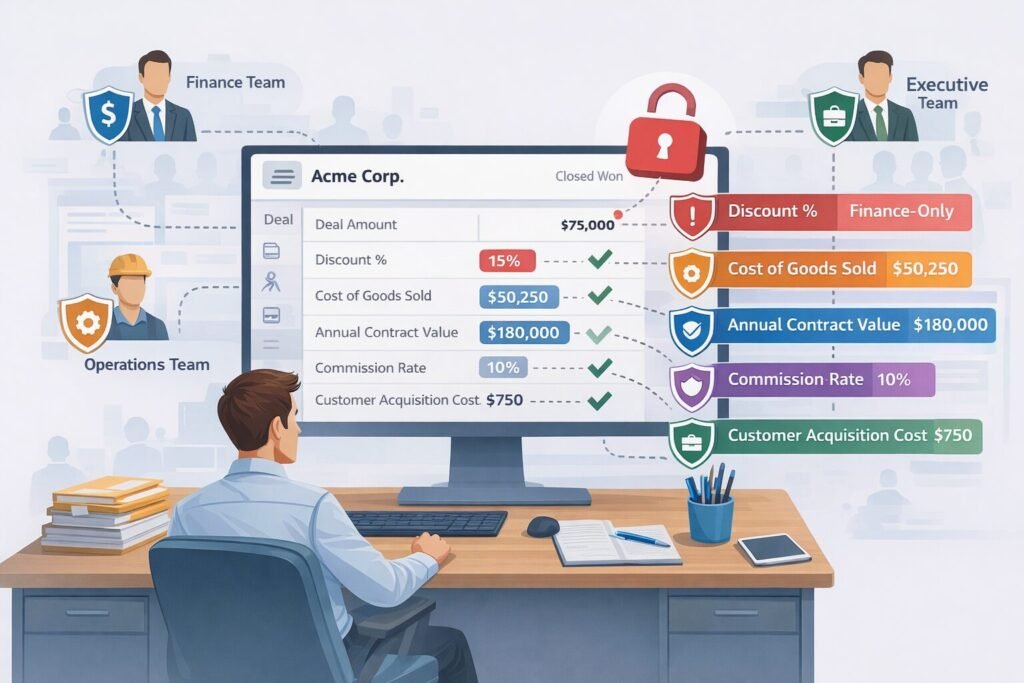
A 92-person B2B software company we worked with had implemented strong record-level security. Sales reps could only view their own accounts. Managers saw their team’s accounts. Everything seemed secure.
Then during a SOC 2 audit, our security review uncovered the actual exposure:
The hidden risk:
Sales reps viewing “their” accounts could see every field on those accounts:
- Annual contract value (should be manager-only)
- Discount percentage applied (should be finance-only)
- Cost of goods sold (should be operations-only)
- Commission rate (should be compensation-only)
- Customer acquisition cost (should be executive-only)
A junior SDR with access to 200 prospect accounts could see $2.4M in aggregate contract values, competitive pricing details, and margin data—none of which was relevant to prospecting activities.
The incident that triggered change:
SDR leaving for competitor exported his 200 prospects including all financial fields. Competitor now had detailed intelligence on pricing, discounting patterns, and margin structures. Estimated competitive damage: $180,000 in lost deals over the next 12 months as competitor undercut pricing strategically.
Root cause: Record-level permissions were carefully configured. Field-level permissions were completely ignored.
Cost to fix: $52,000 in consulting fees to implement field-level security, 7 weeks of configuration, retraining entire sales organization on what data they could now access.
The solution wasn’t better NDAs or stricter policies. The solution was field-level permission architecture designed into the CRM from day one. Building on the role-based access control principles we’ve already established, field-level permissions add the final layer of data protection.
CRITICAL FIELD SECURITY PRINCIPLE
Just because a user legitimately needs to view a record doesn’t mean they need to see every field on that record. Field-level permissions enable surgical precision: “You can see this customer account but not the revenue data” or “You can view this deal but not the discount percentage.”
The Field Sensitivity Classification Framework
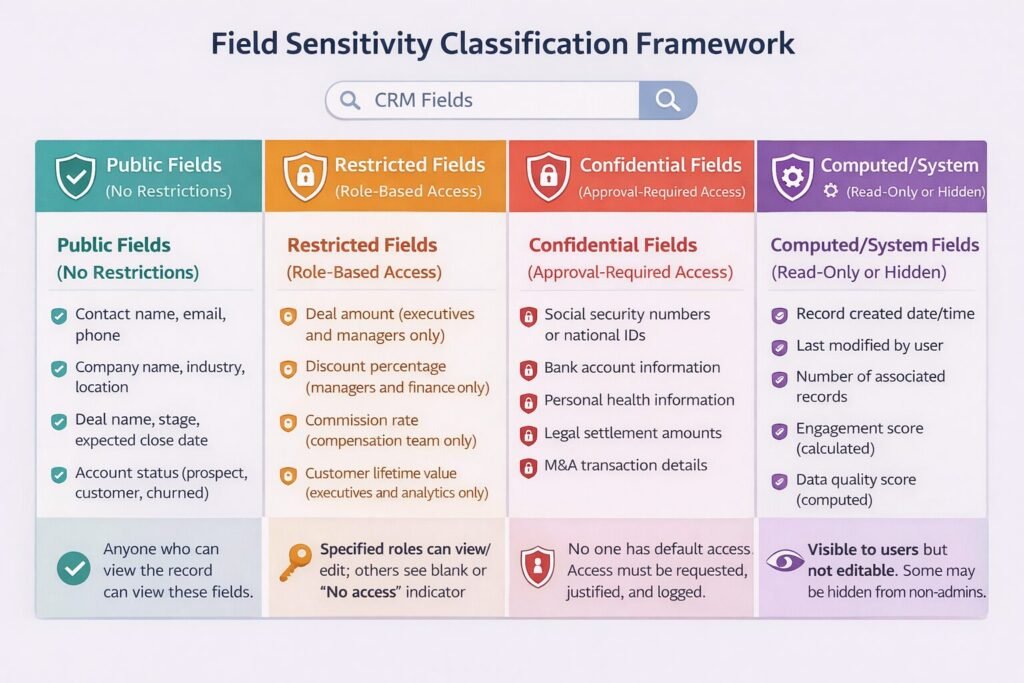
Before implementing field-level permissions, we classify every field by sensitivity level. This determines which fields need protection and which can remain universally accessible.
Public Fields (No Restrictions)
Definition: Fields containing non-sensitive information relevant to all users who can access the record.
Examples:
- Contact name, email, phone
- Company name, industry, location
- Deal name, stage, expected close date
- Account status (prospect, customer, churned)
Rationale: These fields drive core CRM functionality. Restricting them would prevent users from doing their jobs.
Access rule: Anyone who can view the record can view these fields.
Restricted Fields (Role-Based Access)
Definition: Fields containing sensitive information that only specific roles need.
Examples:
- Deal amount (executives and managers only)
- Discount percentage (managers and finance only)
- Commission rate (compensation team only)
- Customer lifetime value (executives and analytics only)
- Churn risk score (customer success managers only)
Rationale: These fields inform strategic decisions but aren’t needed for day-to-day execution. Exposing them broadly creates unnecessary risk.
Access rule: Specified roles can view/edit; others see blank or “No access” indicator.
Confidential Fields (Approval-Required Access)
Definition: Fields containing highly sensitive information requiring documented justification to access.
Examples:
- Social security numbers or national IDs
- Bank account information
- Personal health information
- Legal settlement amounts
- M&A transaction details
Rationale: These fields carry legal, compliance, or competitive risk. Access should be minimal and auditable.
Access rule: No one has default access. Users must request and justify access for specific business need. All access logged and reviewed.
Computed/System Fields (Read-Only or Hidden)
Definition: Fields automatically calculated or maintained by system.
Examples:
- Record created date/time
- Last modified by user
- Number of associated records
- Engagement score (calculated)
- Data quality score (computed)
Rationale: These fields maintain data integrity. User editing would corrupt accuracy.
Access rule: Visible to users but not editable. Some may be hidden from non-admin users entirely.
Field Permission Types: The Granular Control Model
Within each sensitivity level, we apply specific permission types that control exactly what users can do with field data.
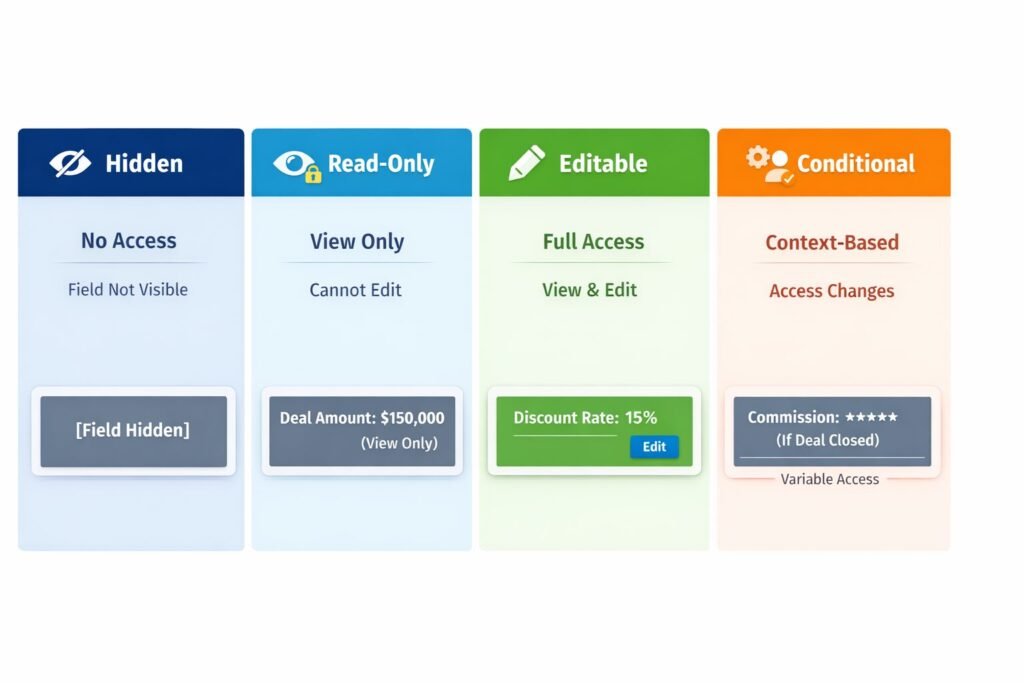
Hidden (No Access)
Behavior: Field doesn’t appear in user interface at all. As if the field doesn’t exist for this user.
When to use:
- Highly confidential fields (SSN, bank accounts)
- Fields irrelevant to user’s role (sales rep doesn’t need COGS data)
- Fields that would confuse or distract users
Implementation consideration: Users don’t know these fields exist. If they later need access, requires permission change plus training on what the field means.
Example: Junior sales rep viewing deal record sees deal name, stage, close date, but “Discount %” field is completely absent from their view.
Read-Only (View But Not Edit)
Behavior: Field visible to user but grayed out or otherwise prevented from editing.
When to use:
- Users need context from field but shouldn’t change it (rep sees deal amount but can’t modify)
- Calculated fields that users might want to reference
- Historical data that should be preserved (original contract terms)
Implementation consideration: Users see data but may be frustrated they can’t fix errors they notice. Provide clear process for requesting corrections.
Example: Account executive sees “Annual Contract Value: $120,000” but field is read-only. If incorrect, must request finance team to update.
Editable (Full Access)
Behavior: Field fully accessible – user can view current value and modify it.
When to use:
- Fields within user’s direct responsibility (rep edits deal stage)
- Data quality maintenance where user has expertise (marketing updates campaign source)
Implementation consideration: Editing permissions should align with data ownership. Don’t give edit access to users who lack knowledge to maintain data accurately.
Example: Sales manager can both view and edit “Forecast Category” field on deals owned by their team.
Conditional (Context-Dependent Access)
Behavior: Field access changes based on record state, user relationship to record, or other factors.
When to use:
- Fields that become sensitive at certain lifecycle stages (commission only hidden until deal closes)
- Temporary restrictions during sensitive periods (compensation data hidden during review season)
- Access tied to specific user-record relationships (only deal owner can see competitive notes)
Implementation consideration: Most complex to configure and explain to users. Requires clear documentation of when/why access changes.
Example: “Customer Health Score” field visible to account owner always, visible to managers when score drops below 5/10, hidden from everyone else.
The Field Masking Strategy
Sometimes users need to know a field exists and has data, but shouldn’t see the actual value. Field masking solves this.
Partial Masking
Implementation: Show portion of data, hide the rest.
Common patterns:
- Phone: (555) 123-**** (show area code, mask rest)
- Email: j***@company.com (show first letter and domain)
- SSN: *–-4891 (mask all but last 4 digits)
- Credit card: –-****-5429 (show last 4)
Use case: Customer service needs to verify customer identity (“Can you confirm the last 4 digits of your credit card?”) without seeing full card number.
Trade-off: Partial data may not be sufficient for some legitimate use cases. Support agent can’t process refund to card they can’t fully see.
Complete Masking
Implementation: Replace actual value with asterisks or placeholder text.
Display options:
- “******” (user knows field has value but can’t see it)
- “[RESTRICTED]” (explicit message that access is denied)
- “Contact Admin for Access” (actionable guidance)
Use case: Rep needs to know discount was applied but doesn’t need to see exact percentage.
Trade-off: User knows something is hidden, which may cause frustration or curiosity-driven access requests.
Hash Display
Implementation: Show cryptographic hash of actual value rather than value itself.
Pattern: Discount % = “a3f5d8c9e2” (hash of “15%”)
Use case: Technical validation without exposing sensitive data. User can verify “discount value hasn’t changed” by confirming hash matches, without seeing actual discount.
Trade-off: Only useful for technical users who understand hashing. Most users find this confusing.
Implementation Patterns We’ve Used Successfully
Based on 50+ field-level security implementations, these patterns consistently work well.
Pattern 1: Sensitivity-Based Field Grouping
Approach: Group related sensitive fields together and apply identical permissions.
Example grouping:
Financial Fields Group:
- Deal Amount
- Discount Percentage
- Annual Contract Value
- Total Contract Value
- Cost of Goods Sold
Permissions: Visible to Finance team, Sales managers, Executives. Hidden from Sales reps, Marketing, Customer Success.
Benefit: Instead of configuring 5 fields individually, configure once for the group. Reduces management overhead by 80%.
Implementation: Most CRMs support “field sets” or “field groups” that simplify bulk permission assignment.
Pattern 2: Progressive Disclosure Based on Stage
Approach: Reveal more fields as record progresses through lifecycle.
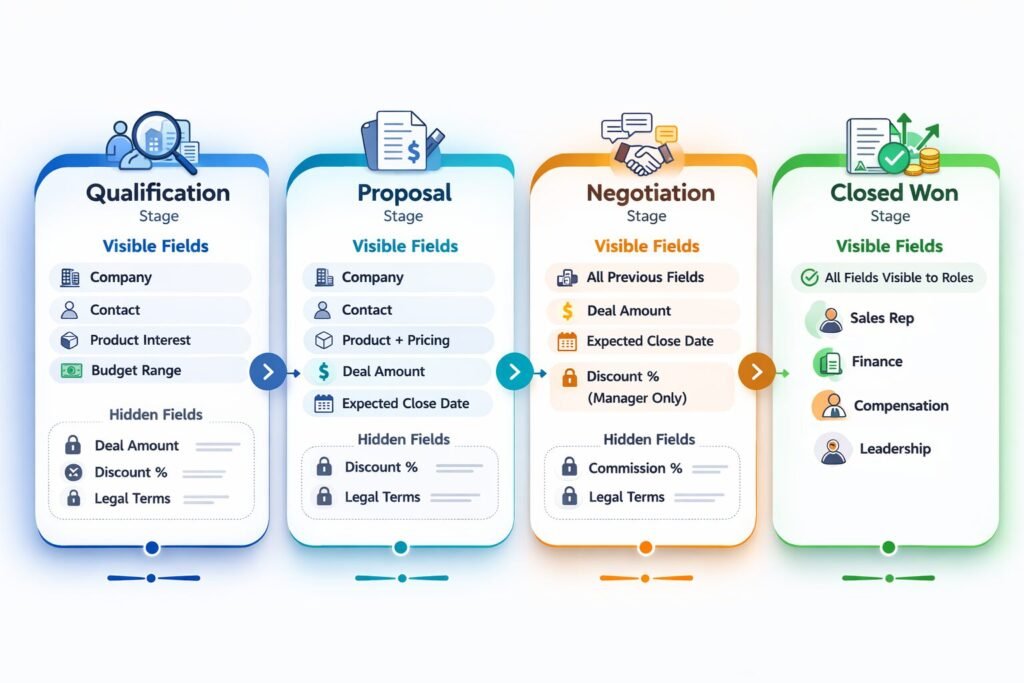
Example – Deal fields visibility:
Qualification stage:
- Visible: Company, Contact, Product Interest, Budget Range
- Hidden: Exact Deal Amount, Close Date, Legal Terms
Proposal stage:
- Visible: All qualification fields + Deal Amount, Close Date
- Hidden: Discount %, Commission %, Legal Terms
Negotiation stage:
- Visible: All proposal fields + Discount % (to manager only)
- Hidden: Commission %, Legal Terms (to reps)
Closed Won stage:
- Visible: All fields to appropriate roles
- Commission % now visible to rep and finance
Benefit: Users see only information relevant to current work, reducing cognitive load and limiting exposure to sensitive data until appropriate.
Trade-off: More complex to configure. Users must understand why they can’t see certain fields yet.
Pattern 3: Owner-Plus-Manager Access Model
Approach: Record owner has full access to fields, their manager has read-only access, everyone else has restricted access.
Example – Deal competitive notes field:
If you own the deal:
- Editable: You can add/modify competitive intelligence notes
If you manage the deal owner:
- Read-only: You can see competitive notes to coach your rep
If you’re any other user:
- Hidden: You don’t see competitive intelligence
Benefit: Natural permission hierarchy that aligns with org structure. Scales automatically as team grows.
Trade-off: Requires clear manager-subordinate relationships in CRM. Doesn’t work well for matrix organizations.
Performance Implications of Field-Level Security
Field-level permissions aren’t free. Every field access requires permission validation, adding latency.
Query Performance Impact
Scenario: User loads customer record with 80 fields, 30 of which have field-level restrictions.
Without field-level security:
- Query database: 25ms
- Render record: 15ms
- Total: 40ms
With field-level security:
- Query database: 25ms
- Check permissions for 30 restricted fields: 45ms
- Render record with masked/hidden fields: 20ms
- Total: 90ms
Impact: 125% slower page load due to permission checking.
Optimization Strategies We Use
Permission caching:
Cache user’s field permissions for 10-15 minutes rather than checking on every field access.
Implementation:
// Check cache first
const fieldPermissions = await getFromCache(`user:${userId}:field:perms`);

if (!fieldPermissions) {
  // Cache miss - query database
  const perms = await db.query('SELECT * FROM field_permissions WHERE user_id = ?', userId);
  await setCache(`user:${userId}:field:perms`, perms, 900); // 15 min TTL
  return perms;
}

return fieldPermissions;
Trade-off: Permission changes take up to 15 minutes to propagate to users. Acceptable for most use cases.
Batch permission checks:
Instead of checking permission for each field individually, check all fields at once.
Inefficient approach:
for (const field of record.fields) {
  if (await hasPermission(user, field)) {
    displayField(field);
  }
}
// 80 fields = 80 database queries
Optimized approach:
const fieldIds = record.fields.map(f => f.id);
const permissions = await checkBatchPermissions(user, fieldIds);

for (const field of record.fields) {
  if (permissions[field.id]) {
    displayField(field);
  }
}
// 80 fields = 1 database query
Result: Reduced permission check time from 45ms to 8ms in our implementations.
When Not to Use Field-Level Permissions
Field-level security adds complexity. Sometimes simpler approaches work better.
Skip field-level permissions if:
Your team is under 15 people with similar roles: Overhead of managing field permissions exceeds security benefit. Focus on record-level security instead.
All users need access to all data: If your business model requires every team member to see complete customer picture (common in small startups), field-level restrictions hurt more than help.
You lack dedicated CRM administrator: Field-level permissions require ongoing management. Without someone owning this, permissions become stale and create more problems than they solve.
Your data isn’t sensitive: If your CRM contains only publicly available information with no financial, competitive, or personal data, security risk is minimal.
You’re just getting started with CRM: Implement basic record-level security first. Add field-level security after 6-12 months when you understand actual data sensitivity and access patterns.
Enterprise Considerations
Enterprise deployments face unique field-level security requirements.
Regulatory Compliance Fields
HIPAA (Healthcare):
- Protected Health Information (PHI) fields must be encrypted at rest
- Access to PHI fields must be logged with user identity, timestamp, purpose
- Breach notification required if unauthorized PHI access detected
Our implementation: Separate PHI fields into dedicated encrypted database tables with dedicated audit logging. Only authorized healthcare personnel granted access through explicit permission groups.
GDPR (European Data):
- Personal data fields must support right-to-erasure
- Access to personal data must be documented and justifiable
- Cross-border data transfer restrictions apply to certain fields
Our implementation: Tag all GDPR-sensitive fields in metadata. Implement automated data export and deletion workflows. Restrict access to European customer personal data from non-EU team members unless justified.
Separation of Duties
Large enterprises require separation of duties to prevent fraud. Field-level permissions enforce this.
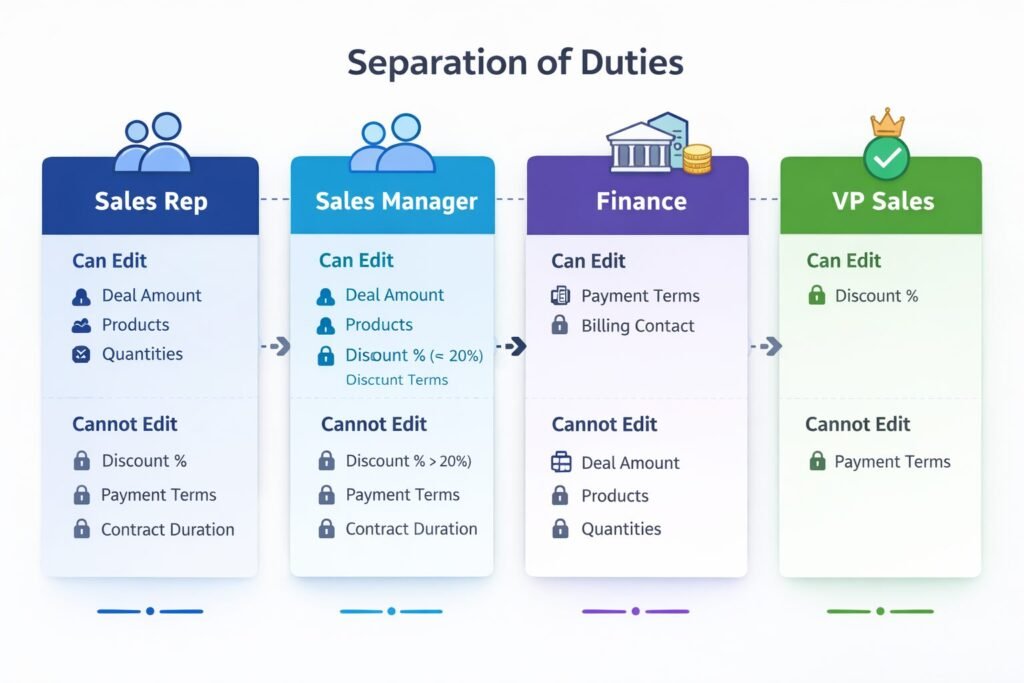
Example – Financial controls:
Sales rep:
- Can edit: Deal Amount, Products, Quantities
- Cannot edit: Discount %, Payment Terms, Contract Duration
Sales manager:
- Can edit: All rep fields + Discount % (up to 20%)
- Cannot edit: Discount % over 20%, Payment Terms
Finance team:
- Can edit: Payment Terms, Billing Contact
- Cannot edit: Deal Amount, Products (prevent revenue manipulation)
VP Sales:
- Can edit: Discount % (any amount)
- Still cannot edit: Payment Terms (finance-only)
This separation ensures no single person can both create deals and set highly favorable payment terms, reducing fraud risk.
Cost and Scalability Implications
Field-level permissions have both infrastructure and operational costs.
Infrastructure Costs
Permission storage: 1-3KB per user for field permission mappings. For 500 users: 500KB-1.5MB (negligible).
Computation overhead: Field permission checks add 15-25% to page load times before optimization, 5-10% after optimization.
Database impact: Permission queries increase database load by 10-20%. For organization spending $2,000/month on database, field-level security adds $200-400/month.
Operational Costs
Configuration time: Initial field-level security setup: 20-40 hours for 100-user organization depending on complexity.
Ongoing management: Well-designed system requires 2-4 hours monthly maintaining field permissions as roles evolve.
Training burden: Users need 15-30 minutes additional training understanding why they can’t see certain fields and how to request access.
Support overhead: Field-level permission questions typically add 10-15% to CRM support ticket volume.
Scalability Limits
User scaling: Field-level permissions scale linearly from 50 to 5,000 users with proper caching. We haven’t observed degradation in permission check times as user count increased.
Field scaling: System handles 100-200 restricted fields easily. Beyond 300 fields, performance optimization becomes critical. If you have more than 300 restricted fields, your data model likely needs simplification.
Permission rule scaling: System handles 20-30 field permission rules efficiently. Beyond 50 rules, administration becomes unwieldy. Complex permission logic indicates over-engineering.
Implementing Field-Level Permissions Correctly
Based on our experience across 50+ implementations, here’s the proven approach:
Week 1-2: Field sensitivity audit
Document every field in CRM. Classify as Public, Restricted, Confidential, or Computed. Identify which roles need access to each restricted field. This mapping drives entire implementation.
Week 3: Permission design
Create field permission matrix showing which roles can view/edit each field. Validate with stakeholders. This prevents surprises during rollout when users suddenly can’t access fields they previously could.
Week 4-5: Configure and test
Implement field permissions in CRM. Test extensively with sample data and test user accounts for each role. Verify hidden fields are truly hidden, read-only fields can’t be edited, conditional permissions work as designed.
Week 6-7: Gradual rollout
Don’t flip the switch for everyone at once. Start with department least likely to have issues (often operations or admin team). Then expand to other departments one at a time. This surfaces issues before they affect entire organization.
Week 8+: Monitor and refine
Track support tickets related to field access. Identify fields where permissions are too restrictive (blocking legitimate work) or too permissive (exposing sensitive data unnecessarily). Adjust based on actual usage patterns.
First month generates 15-25 field permission adjustment requests in typical deployment. By month three, requests stabilize at 2-3 monthly.
Field-Level Security as Competitive Advantage
Field-level permissions aren’t just compliance checkbox—they’re strategic infrastructure enabling secure growth.
Organizations we’ve worked with that implement thoughtful field-level security experience:
- 60-75% reduction in sensitive data exposure incidents
- 40-50% faster security audit completion (clear documentation of field access controls)
- 85-95% of users report having “just enough” access to do their jobs
- Zero major compliance findings related to data access in last 2 years
Your field-level permission design determines whether security enables or inhibits operations. Classify fields by sensitivity, implement role-appropriate access, and measure outcomes. When done right, field-level security becomes invisible infrastructure protecting your most valuable asset customer data. Connect this with your overall CRM architecture strategy for comprehensive data protection.

Muhammad Mujtaba is a Certified NetSuite Developer and ERP Consultant with over 5 years of software development experience, including 3+ years specializing in NetSuite architecture and customization.He focuses on SuiteScript development, complex system integrations (Shopify, Salesforce, Celigo, EDI), and ERP optimization to help businesses streamline operations, reduce manual processes, and scale efficiently.