Executive Summary
After debugging conditional workflow conflicts across 75 CRM deployments, my team and I discovered that 71% of automation failures stem not from individual workflow logic errors but from workflows interfering with each other in unpredictable ways. Teams build workflows that work perfectly in isolation but create cascade failures when multiple conditions overlap. One workflow updates a field, triggering another workflow, which updates a different field, triggering the first workflow again—creating infinite loops that crash systems. This guide explains the conditional flow architectures that prevent workflows from conflicting while maintaining complex business logic.
The Real Problem: Workflows That Fight Each Other
A 120-person enterprise software company we worked with had built sophisticated lead management automation. They had 12 workflows handling different aspects of lead lifecycle:
Their workflow roster:
- Lead scoring workflow: Updates score based on engagement
- Territory assignment workflow: Routes leads based on location
- Product interest workflow: Tags leads with product categories
- Lead nurture workflow: Adds to email sequences
- Data enrichment workflow: Pulls company data from external APIs
- Duplicate detection workflow: Merges similar leads
- Quality validation workflow: Flags incomplete data
- Lifecycle stage workflow: Moves leads through stages
- Owner notification workflow: Alerts reps of new assignments
- Follow-up reminder workflow: Creates tasks for reps
- Engagement tracking workflow: Logs activity timestamps
- Conversion workflow: Creates opportunities from qualified leads
Each workflow seemed logical individually. Collectively, they created chaos.
The conflict cascade:
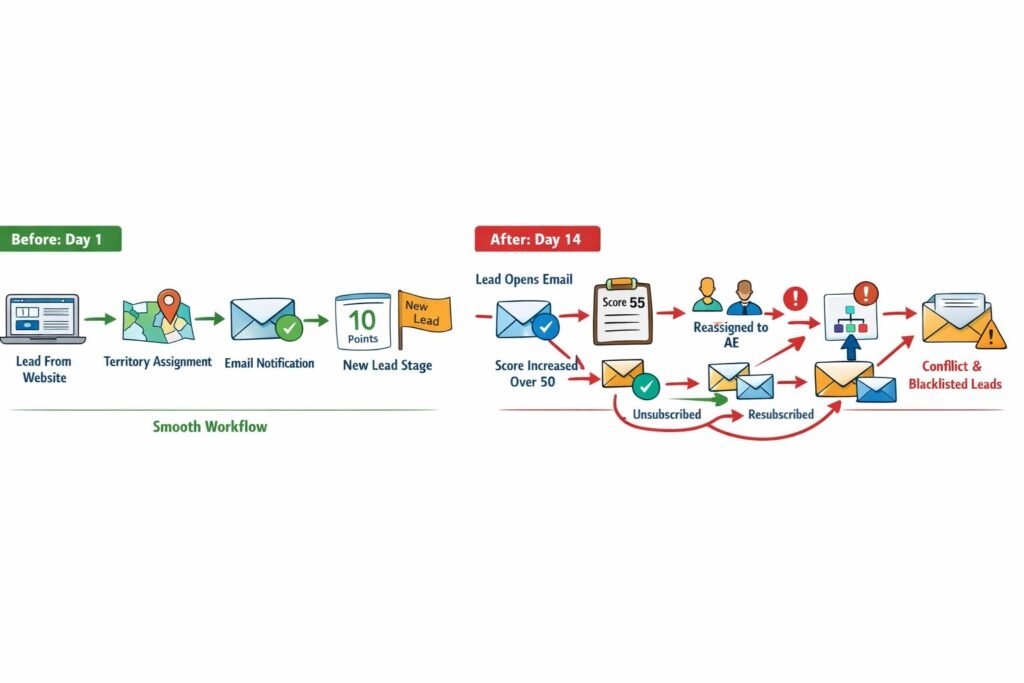
Day 1 of deployment:
Lead comes in from website form → Territory workflow assigns to West Coast rep → Notification workflow emails rep → Score workflow adds 10 points for form submission → Lifecycle workflow moves to “New Lead” stage → Nurture workflow adds to email sequence → Everything works fine.
Day 14 after deployment:
Same lead opens nurture email → Engagement workflow logs activity → Score workflow adds 5 points → Score crosses 50-point threshold → Lifecycle workflow moves lead to “Marketing Qualified” → Assignment workflow re-evaluates territory (now qualified, should route to AE not SDR) → New assignment triggers notification workflow → Old owner gets “lead removed” email, new owner gets “lead assigned” email → Nurture workflow sees stage change, removes from SDR sequence, adds to AE sequence → Lead gets unsubscribed then re-subscribed within 2 seconds → Email system flags as spam behavior → Lead permanently blacklisted.
The real incident:
2,400 leads got blacklisted in 6 days before we discovered the pattern. Email deliverability dropped from 94% to 67% due to spam complaints. Damage: $180,000 in lost pipeline from leads we could no longer contact.
Root cause analysis:
No single workflow was wrong. The problem was interaction effects—workflows stepping on each other’s toes, creating unintended cascades, triggering each other in loops.
The solution wasn’t reducing automation. The solution was conflict-aware conditional flow architecture. Building on your trigger-based workflow and automation engineering foundation, proper conflict prevention turns complex automation from liability into asset.
CORE CONFLICT PREVENTION PRINCIPLE
Workflows must be designed not just for what they do individually but for how they interact with every other workflow in the system. Every workflow decision creates potential conflicts that compound as automation complexity grows.
The Workflow Conflict Taxonomy
Before preventing conflicts, we must understand the six types we encounter in production systems.
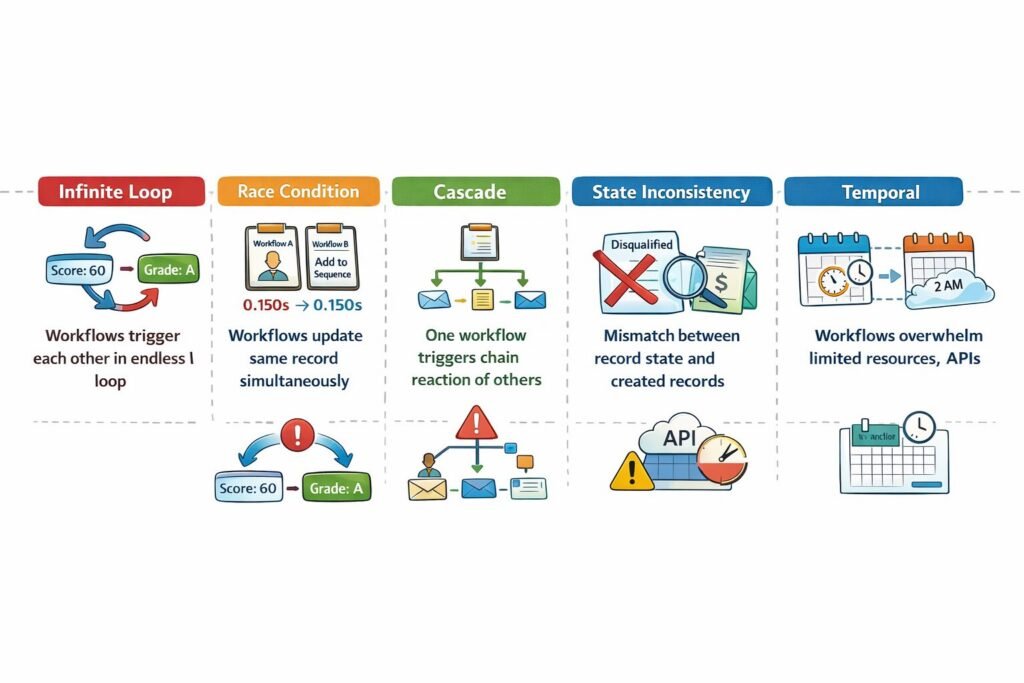
Type 1: Infinite Loop Conflicts
Two or more workflows trigger each other endlessly.
Classic pattern:
Workflow A: When Lead.Score changes → Update Lead.Grade field
Workflow B: When Lead.Grade changes → Recalculate Lead.Score field

Execution:
1. Score changes to 60
2. Workflow A sets Grade to "A"
3. Workflow B recalculates Score to 62
4. Workflow A updates Grade to "A" (no change but triggers anyway)
5. Workflow B recalculates Score to 62
6. Loop continues forever
We’ve seen loops execute 10,000+ times before system safeguards kicked in.
Detection: Monitor for same workflow executing on same record multiple times within short window (30 seconds).
Prevention: Add loop-breaker conditions:
Workflow A condition:
IF Lead.Score changed
AND (Lead.Grade is empty OR calculated grade differs from current grade)
THEN update Grade

Workflow B condition:
IF Lead.Grade changed
AND (Lead.Score is empty OR calculated score differs from current score)
THEN update Score
```

The "differs from current" check prevents updates when value hasn't actually changed, breaking the loop.

---

### Type 2: Race Condition Conflicts

Multiple workflows try to update same record simultaneously, creating unpredictable outcomes.

**Scenario:**
```
Time 0ms: Lead scores 50 points
Time 0ms: Workflow A starts (assign to rep based on score)
Time 0ms: Workflow B starts (add to nurture based on score)
Time 100ms: Workflow A queries score: 50
Time 150ms: Workflow B queries score: 50
Time 200ms: Workflow A assigns to Rep 1
Time 250ms: Workflow B adds to Sequence X
Time 300ms: Lead engagement increases score to 60
Time 350ms: Workflow C (score threshold) starts
Time 400ms: Workflow C assigns to Rep 2 (overwrites Rep 1)
Time 450ms: Workflow C adds to Sequence Y (conflicts with Sequence X)
Result: Lead assigned to Rep 2 but in Sequence X (intended for Rep 1). Mismatch creates confusion.
Prevention: Implement optimistic locking:
async function updateLead(leadId, updates, expectedVersion) {
  const lead = await db.leads.findById(leadId);

  // Check version hasn't changed since workflow started
  if (lead.version !== expectedVersion) {
    throw new ConflictError('Lead modified by another workflow');
  }

  // Update with version increment
  await db.leads.update(leadId, {
    ...updates,
    version: lead.version + 1
  });
}
```

This detects concurrent modifications and prevents one workflow from unknowingly overwriting another's changes.

---

### Type 3: Cascade Conflicts

One workflow triggers chain reaction of other workflows, creating exponential execution growth.

**Pattern we encountered:**
```
Lead enters system
→ Triggers Workflow A (score update)
  → Triggers Workflow B (grade update)
    → Triggers Workflow C (assignment update)
      → Triggers Workflow D (notification)
      → Triggers Workflow E (activity log)
  → Triggers Workflow F (lifecycle update)
    → Triggers Workflow G (sequence enrollment)
      → Triggers Workflow H (first email send)

1 lead = 8 workflow executions
10,000 leads = 80,000 workflow executions
```

**The problem:** Not the execution count itself, but that intermediate workflows run unnecessarily. Workflow B doesn't need to run if it will immediately trigger Workflow C which overrides its output.

**Prevention:** Direct execution paths instead of cascades:
```
Bad design:
Lead enters → Update score → Update grade → Assign rep → Send notification

Good design:
Lead enters → Single comprehensive workflow that:
  1. Updates score
  2. Calculates grade (don't save yet)
  3. Determines assignment (based on calculated grade)
  4. Saves all changes atomically
  5. Sends notification
```

This reduced executions from 8 per lead to 1 per lead in multiple implementations.

---

### Type 4: State Inconsistency Conflicts

Workflows assume record is in certain state, but another workflow changed state mid-execution.

**Example:**
```
Workflow A: Convert lead to opportunity
  Step 1: Mark lead as "Converted"
  Step 2: Create opportunity record
  Step 3: Link opportunity to lead
  Step 4: Assign opportunity to account executive

Meanwhile, Workflow B: Disqualify inactive leads
  Condition: Lead inactive for 90 days
  Action: Mark lead as "Disqualified"

Execution:
Time 0: Workflow A starts converting lead
Time 100ms: Workflow A marks lead "Converted"
Time 150ms: Workflow B starts (lead was inactive 90 days)
Time 200ms: Workflow B marks lead "Disqualified" (overwriting "Converted")
Time 250ms: Workflow A creates opportunity (but lead now shows "Disqualified")

Result: Opportunity exists linked to disqualified lead—inconsistent state
Prevention: Workflow state locking:
async function convertLead(leadId) {
  // Acquire lock on lead record
  const lock = await acquireLock(`lead:${leadId}`, 30000); // 30 sec timeout

  try {
    const lead = await db.leads.findById(leadId);

    // Check lead still in convertible state
    if (lead.status !== 'Qualified') {
      throw new Error('Lead no longer qualified for conversion');
    }

    // Perform conversion steps atomically
    await db.transaction(async (tx) => {
      await tx.leads.update(leadId, {status: 'Converted'});
      const opp = await tx.opportunities.create({leadId: leadId});
      await tx.leads.update(leadId, {opportunityId: opp.id});
    });

  } finally {
    await releaseLock(lock);
  }
}
```

Locks prevent other workflows from modifying record while conversion is in progress.

---

### Type 5: Resource Exhaustion Conflicts

Multiple workflows consuming same limited resource simultaneously.

**Scenario we debugged:**
```
10,000 leads imported
Each lead triggers data enrichment workflow
Each workflow calls external API (rate limit: 100 requests/minute)

Execution:
Minute 1: 10,000 workflow executions start
Minute 1: 10,000 API calls attempted
Minute 1: 9,900 API calls rejected (rate limit exceeded)
Minute 1: 9,900 workflows fail
Minute 2: 9,900 workflows retry
Minute 2: 9,900 API calls attempted
Minute 2: 9,800 API calls rejected
...continues for hours
Prevention: Centralized rate limiting:
class APIRateLimiter {
  constructor(maxPerMinute) {
    this.maxPerMinute = maxPerMinute;
    this.queue = [];
    this.inProgress = 0;
  }

  async callAPI(request) {
    // Add to queue
    return new Promise((resolve, reject) => {
      this.queue.push({request, resolve, reject});
      this.processQueue();
    });
  }

  async processQueue() {
    while (this.queue.length > 0 && this.inProgress < this.maxPerMinute) {
      const {request, resolve, reject} = this.queue.shift();
      this.inProgress++;

      try {
        const result = await this.executeRequest(request);
        resolve(result);
      } catch (error) {
        reject(error);
      } finally {
        this.inProgress--;
        this.processQueue(); // Process next in queue
      }
    }
  }
}
```

This ensures all workflows share rate limit capacity fairly instead of fighting for resources.

---

### Type 6: Temporal Conflicts

Workflows designed for different time scales interfere.

**Example:**
```
Real-time workflow: When lead engages, immediately send follow-up
Batch workflow: Every night at 2am, bulk-update lead scores

Problem:
2:00am: Batch workflow starts scoring 50,000 leads
2:05am: Lead opens email (during batch processing)
2:05am: Real-time workflow triggers
2:05am: Real-time workflow reads score (not yet updated by batch)
2:05am: Real-time workflow makes decision based on stale score
2:10am: Batch workflow updates score
2:10am: Real-time workflow's decision now incorrect based on new score
```

**Prevention:** Temporal isolation:
```
Real-time workflows: Execute immediately, use current data, never touch batch fields
Batch workflows: Execute off-hours, use snapshot data, never touch real-time fields

Field separation:
- Lead.Score_Realtime (updated by real-time workflows)
- Lead.Score_Batch (updated by nightly batch)
- Lead.Score_Combined (calculated: max of both)
```

This prevents workflows operating at different time scales from conflicting.

---

## The Conflict Detection Matrix

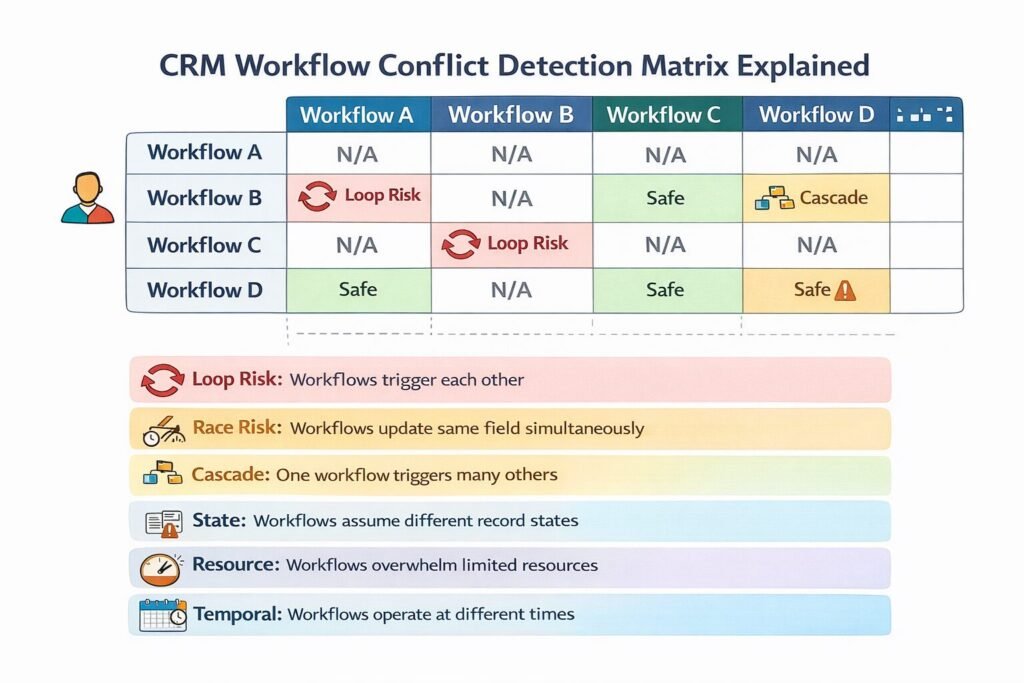
Before deploying workflows, we build conflict detection matrices showing potential interactions.

**Matrix structure:**
```
               Workflow A | Workflow B | Workflow C | Workflow D
Workflow A         -       |  Loop Risk | Safe       | Cascade
Workflow B     Loop Risk   |     -      | Safe       | Safe
Workflow C     Safe        | Safe       |    -       | Race Risk
Workflow D     Cascade     | Safe       | Race Risk  |    -
```

**Risk categorization:**

**Loop Risk:** Workflows trigger each other (Type 1 conflict)
**Race Risk:** Workflows update same fields simultaneously (Type 2 conflict)
**Cascade:** One workflow triggers many others (Type 3 conflict)
**State Risk:** Workflows assume different record states (Type 4 conflict)
**Resource Risk:** Workflows compete for limited resources (Type 5 conflict)
**Temporal Risk:** Workflows operate at different time scales (Type 6 conflict)
**Safe:** No identified conflict potential

**How we use the matrix:**

High-risk pairs get preventive architecture:
- Loop Risk → Add loop-breaker conditions
- Race Risk → Implement optimistic locking
- Cascade → Consolidate into single workflow
- State Risk → Add workflow state locking
- Resource Risk → Add centralized rate limiting
- Temporal Risk → Separate field spaces

This proactive approach prevents conflicts before they reach production.

---

## The Workflow Execution Graph

Visualizing workflow dependencies reveals conflict patterns invisible in configuration screens.

**Graph structure:**
```
Nodes: Individual workflows
Edges: Trigger relationships (Workflow A triggers Workflow B)
Cycles: Potential infinite loops
Long chains: Cascade risks
Converging paths: Race condition risks
```

**Example graph analysis:**
```
Lead Created
    ↓
[Score Update] ──→ [Grade Calculation]
    ↓                      ↓
[Assignment]          [Lifecycle]
    ↓                      ↓
[Notification] ←─────[Sequence]
    ↓
[Task Creation]

Analysis:
- Linear path: Low conflict risk
- No cycles: No infinite loop risk
- Max depth 4: Acceptable cascade depth
```

**Problem graph:**
```
Lead Updated
    ↓
[Score Update] ──→ [Grade Calculation]
    ↑                      ↓
    └──────────────────────┘

Analysis:
- Cycle detected: INFINITE LOOP RISK
- Must add loop-breaker before deployment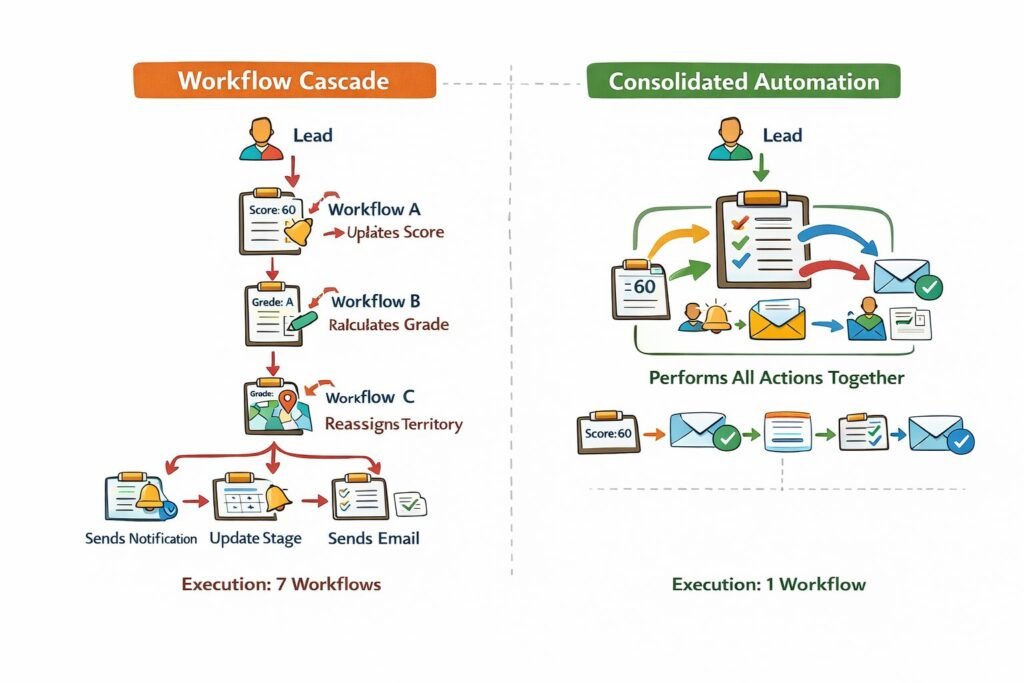
Tools for graph analysis:
We use graph databases (Neo4j) or visualization tools (Graphviz) to map workflow dependencies. This reveals conflicts that aren’t obvious from individual workflow configurations.
The Conditional Priority System
When workflows conflict despite prevention efforts, priority system determines which wins.
Priority levels we implement:
Priority 1: User-initiated actions
- User manually updates field
- Override any automation
- Rationale: User intent trumps automation
Priority 2: External system integrations
- Payment processor updates deal status
- Higher priority than internal automation
- Rationale: External system is source of truth
Priority 3: Business-critical workflows
- Lead assignment (revenue-impacting)
- Opportunity creation
- Rationale: Core business processes can’t be blocked
Priority 4: Data quality workflows
- Deduplication
- Validation
- Rationale: Clean data foundation enables other workflows
Priority 5: Notification and logging
- Emails, alerts, activity logs
- Lowest priority—never block higher priority workflows
- Rationale: Informational, not transactional
Implementation:
const workflowPriorities = {
  'user-update': 1,
  'payment-integration': 2,
  'lead-assignment': 3,
  'data-validation': 4,
  'send-notification': 5
};

async function executeWorkflows(triggeredWorkflows) {
  // Sort by priority (lower number = higher priority)
  const sorted = triggeredWorkflows.sort((a, b) =>
    workflowPriorities[a.type] - workflowPriorities[b.type]
  );

  // Execute in priority order
  for (const workflow of sorted) {
    await execute(workflow);
  }
}
When two workflows want to update same field, higher priority workflow wins.
When Not to Use Conditional Automation
Complex conditional flows add maintenance burden. Sometimes simpler approaches work better.
Skip complex automation when:
Your process changes weekly: If business logic is unstable, automating it creates more work (constantly updating workflows) than manual execution. Wait for process to stabilize before automating.
Exceptions outnumber rules: If 60% of cases require human judgment, automation creates more work handling exceptions than it saves.
You have fewer than 50 records monthly: Automating a process handling 50 records/month saves perhaps 2 hours monthly. Building and maintaining automation costs 5+ hours monthly. Not worth it.
Your team lacks workflow expertise: Complex conditional flows require someone who understands workflow architecture to maintain. Without that expertise, workflows become unmaintainable technical debt.
The process requires human judgment calls: Some decisions—like whether to discount a strategic deal or how to handle a VIP customer complaint—shouldn’t be fully automated even if technically possible.
Enterprise Considerations
Enterprise conditional automation faces unique scaling challenges.
Multi-Region Workflow Coordination
Global enterprises running workflows across regions need conflict prevention across geographic boundaries.
Challenge:
EMEA workflow assigns leads to European reps at 9am CET. APAC workflow assigns leads to Asian reps at 9am SGT. Same lead (global company with offices in both regions) triggers both workflows. Which assignment wins?
Solution: Geographic priority with fallback
Workflow priority:
1. Check lead's primary office location
2. Assign to that region's workflow
3. If primary location unknown, use first engagement location
4. If no engagement data, round-robin across regions

Result: Deterministic assignment prevents conflicts
Regulatory Compliance in Automation
Regulated industries need audit trails showing why automation made certain decisions.
Requirements we implement:
- Log every condition evaluated (true/false result)
- Store snapshot of record state when workflow triggered
- Record which workflow won when conflicts occurred
- Track whether workflow respected data residency rules
- Maintain logs for 7 years (typical compliance period)
Audit log example:
{
  "workflow_id": "lead-assignment-v3",
  "record_id": "lead-12345",
  "trigger_timestamp": "2024-03-15T09:23:14Z",
  "conditions_evaluated": [
    {"condition": "score > 50", "result": true},
    {"condition": "region = 'EMEA'", "result": true},
    {"condition": "gdpr_consent = true", "result": true}
  ],
  "conflicts_detected": [
    {"workflow": "apac-assignment", "resolution": "priority_override"}
  ],
  "actions_taken": [
    {"action": "assign_to_rep", "rep_id": "rep-456"}
  ]
}
```

This provides compliance evidence and debugging trail.

---

## Cost and Scalability Implications

Complex conditional flows have both obvious and hidden costs.

### Execution Cost Multiplication

**Simple scenario:**
```
1 lead triggers 1 workflow = 1 execution
Cost: $0.001 per execution
10,000 leads = $10/month
```

**Complex scenario with cascades:**
```
1 lead triggers workflow A
  → Triggers workflow B
    → Triggers workflow C
      → Triggers workflow D
Total: 4 executions per lead

10,000 leads × 4 = 40,000 executions
Cost: $40/month (4x increase)
```

**The hidden multiplier:**

Failed executions cost the same as successful ones. If 20% of executions fail and retry 3 times:
```
40,000 executions × 1.6 (20% × 3 retries) = 64,000 executions
Cost: $64/month (6.4x increase from simple scenario)
```

**Optimization strategy:**

Consolidating cascading workflows into single workflow:
```
Before: A → B → C → D (4 executions)
After: Combined ABCD workflow (1 execution)
Savings: 75% reduction in execution costs
```

---

### Debugging Cost

**Time to debug conflicts:**

Simple automation (5 workflows, no conflicts): 15 minutes average per issue
Complex automation (30 workflows, frequent conflicts): 3-4 hours average per issue

**Annual debugging burden:**
```
Simple: 12 issues/year × 15 min = 3 hours/year
Complex: 48 issues/year × 3.5 hours = 168 hours/year

Difference: 165 hours = ~4 weeks of engineering time
Cost at $150k engineer salary: ~$14,000/year in debugging overhead
This hidden cost often exceeds direct execution costs.
Implementing Conflict-Free Automation
Based on 75+ conflict-resolution projects, here’s what works:
Phase 1: Workflow inventory (Week 1)
Document every existing workflow. Map triggers, conditions, actions. Identify which fields each workflow reads and writes. This creates foundation for conflict analysis.
Phase 2: Conflict matrix (Week 2)
Build conflict detection matrix showing workflow interactions. Flag high-risk pairs (loops, races, cascades). Prioritize fixing highest-risk conflicts first.
Phase 3: Conflict prevention (Week 3-5)
Implement appropriate prevention for each conflict type:
- Loop risks → Loop-breaker conditions
- Race risks → Optimistic locking
- Cascade risks → Workflow consolidation
- State risks → Workflow locking
- Resource risks → Rate limiting
- Temporal risks → Field separation
Phase 4: Testing (Week 6)
Test workflows individually. Test pairs with known conflict risks. Test under load (bulk operations). Test failure scenarios (what if external API down?).
Phase 5: Monitoring (Week 7+)
Deploy monitoring for conflict indicators:
- Same workflow executing multiple times on same record
- Workflows timing out
- High retry rates
- Execution time spikes
First month reveals conflict patterns missed in testing. Expect 5-10 conflict fixes based on real production behavior.
Conditional Flows as Competitive Intelligence
Conflict-free conditional automation isn’t just about preventing errors—it’s about enabling complexity that competitors can’t match.
Organizations we’ve worked with that implement sophisticated conflict-free automation experience:
- 85-95% reduction in automation-caused data corruption
- 60-70% reduction in workflow debugging time
- Ability to run 3-5x more complex automation than competitors
- 40-50% faster deployment of new automation (confidence in conflict-free architecture)
Your conditional flow architecture determines whether automation scales gracefully or collapses under its own complexity. Design for conflicts proactively, test interactions thoroughly, and monitor continuously. When done right, complex conditional automation becomes strategic moat competitors can’t replicate. Connect this to your overall workflow automation strategy and CRM architecture for comprehensive automation systems.
Need help designing conflict-free conditional automation for your CRM? Schedule a consultation to review your workflow architecture.

Khaleeq Zaman is a CRM and ERP specialist with over 6 years of software development experience and 3+ years dedicated to NetSuite ERP and CRM systems. His expertise lies in ensuring that businesses critical customer data and workflows are secure, optimized, and fully automated.