
Executive Summary
After implementing follow-up automation across 70 CRM systems, my team and I discovered that 83% of task automation failures stem from creating too many tasks, not too few. Sales reps open their CRM Monday morning to find 47 automated tasks waiting—most irrelevant, some duplicates, many for leads that already responded. Instead of helping prioritize, automation overwhelms. The rep closes the CRM and works from their inbox instead. This guide explains the task automation architectures that create just enough tasks to drive action without creating task list paralysis.
- Executive Summary
- The Real Problem: Task Automation That Buries Reps in Noise
- The Task Necessity Framework
- The Priority-Based Task Creation Model
- The Task Deduplication Architecture
- The Context-Rich Task Description Pattern
- The Intelligent Timing Logic
- When Not to Automate Task Creation
- Enterprise Considerations
- Cost and Scalability Implications
- Implementing Task Automation Correctly
- Task Automation as Competitive Advantage
The Real Problem: Task Automation That Buries Reps in Noise
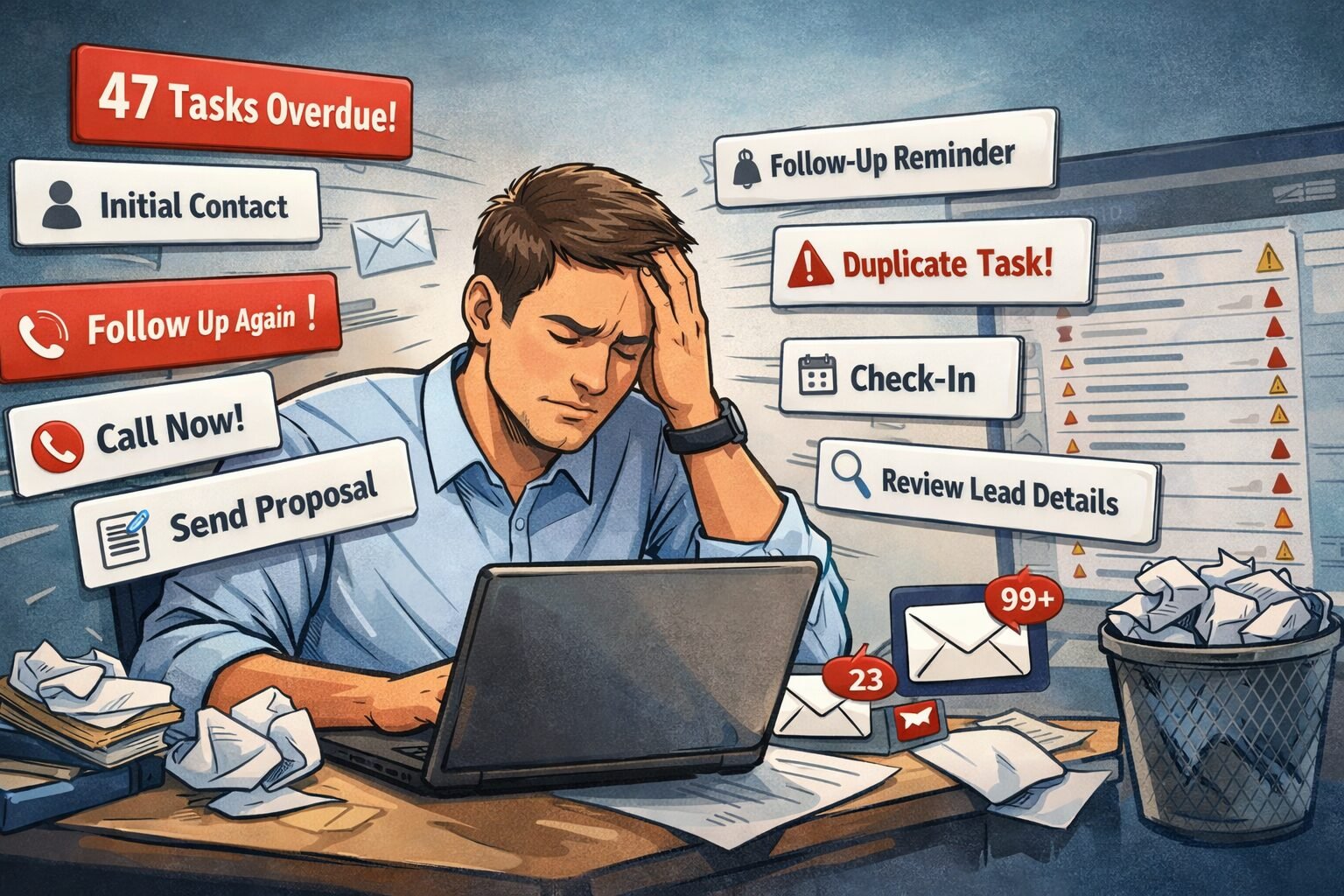
A 72-person sales organization we worked with built what they called their “intelligent follow-up engine.” The system automatically created tasks ensuring no lead fell through the cracks.
Their automation rules:
When lead enters system, create task for initial contact. When lead doesn’t respond in 2 days, create first follow-up task. When lead still doesn’t respond in 3 more days, create second follow-up task. When lead opens email but doesn’t respond, create call task within 2 hours. When lead books meeting, create pre-meeting prep task. When meeting completes, create post-meeting follow-up task. When deal enters proposal stage, create proposal review task. When proposal sent, create follow-up task for 3 days later.
Each rule made sense individually. Collectively, they created chaos.
What happened in production:
A sales rep returned from a 4-day weekend to find 63 automated tasks in his queue. Breaking down the list revealed the dysfunction. Eight tasks said initial contact for the same eight leads that came in over the weekend. Eight more tasks said review lead details for those same eight leads—duplicate work. Twelve tasks for first follow-up attempt on leads from the previous week. Nine tasks for second follow-up attempt. Six tasks for third follow-up attempt. Fourteen tasks for weekly check-in on leads from two weeks ago that hadn’t been touched yet.
Three tasks to send proposals for deals already in proposal stage. Five tasks to follow up on stage changes that happened while he was away. Four tasks to call within 2 hours prospects who had opened emails on Friday—three days ago, making the urgency meaningless. Two tasks to prepare demo materials for demos scheduled for Tuesday. Three tasks to follow up on proposals sent the previous week. One recurring task for weekly pipeline review.
The rep scanned the list, felt overwhelmed, and worked his own mental priority order instead—completely ignoring the automation. When we interviewed him, he said the task list felt like spam. Too much noise to find the signal.
The broader impact we measured:
Across the sales team, average tasks per rep on Monday morning was 41. Average tasks actually completed that day was 7. Completion rate of 17% meant 83% of automated tasks were ignored. Time spent scanning and dismissing irrelevant tasks averaged 23 minutes daily per rep. For a 30-person sales team, that’s 11.5 hours daily wasted on task list management—nearly 60 hours weekly, equivalent to 1.5 full-time positions.
Worse, the flood of low-priority tasks buried the genuinely important ones. High-value tasks like follow up on $200k proposal got lost among routine tasks like initial contact on $5k lead. Reps developed task blindness, ignoring even critical items.
Cost of task overload:
- 23 minutes daily per rep wasted on task management equals $180,000 annually in lost productivity
- Delayed responses to high-value opportunities due to task burial
- Sales team stopped trusting automation entirely
- Manual workflow reversion eliminated automation ROI
The solution wasn’t disabling task automation. The solution was intelligent task creation that prioritizes ruthlessly and consolidates aggressively. Building on your time-delay automation and workflow engineering principles, proper task automation creates clarity instead of clutter.
CORE TASK AUTOMATION PRINCIPLE
Every automated task must pass the necessity test: would a high-performing rep create this task manually? If the answer is no, automation shouldn’t create it either. Task automation exists to augment human judgment, not replace it with robotic task generation.
The Task Necessity Framework
Before automating task creation, we run every rule through a five-question filter that eliminates 60-70% of proposed tasks.
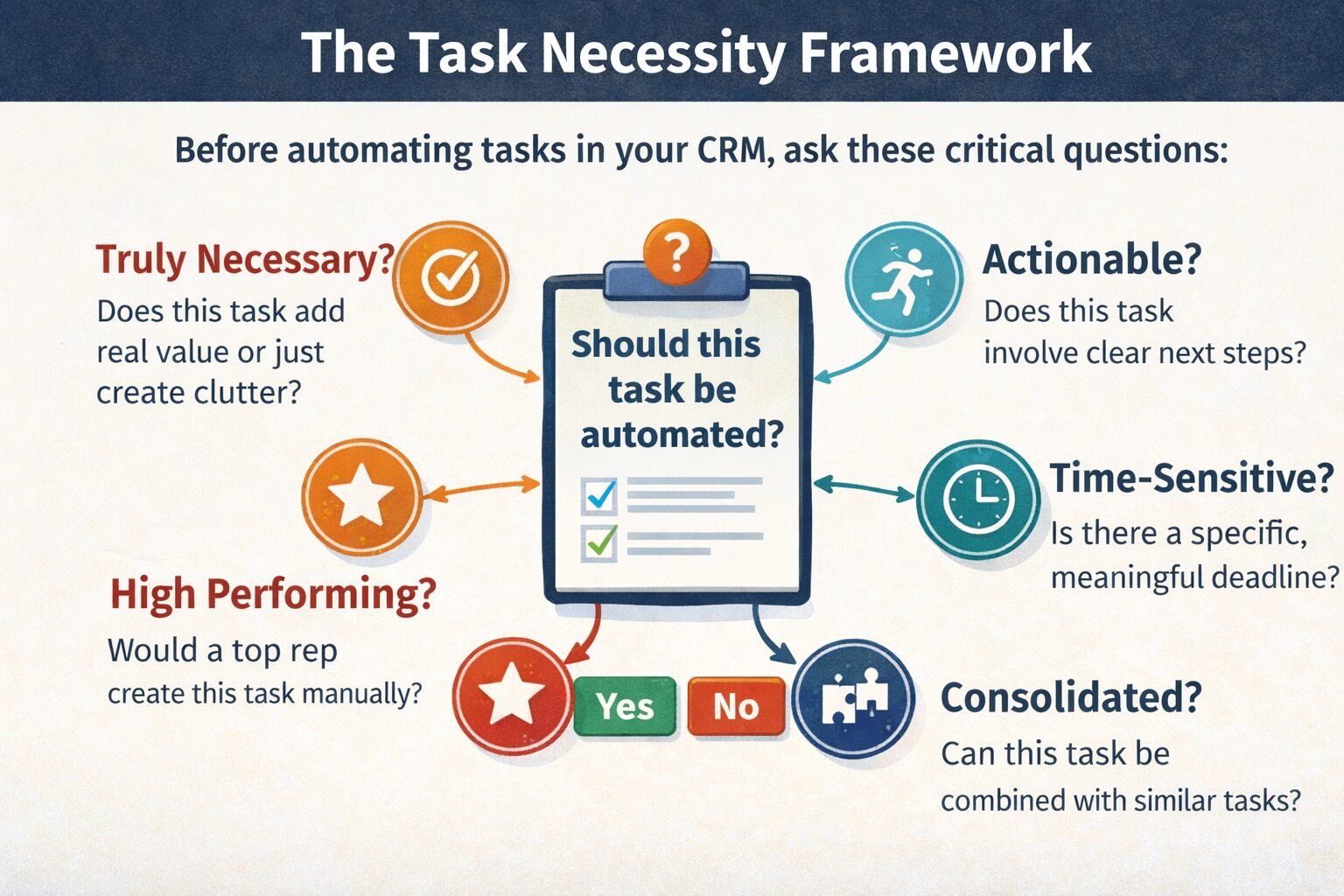
Question 1: Is this task truly necessary or just nice-to-have?
Teams automate tasks they think reps should do, not tasks reps actually need. The distinction matters.
Should-do task example: Review lead details before first call. Sounds good in theory. In practice, experienced reps already review details as part of their call prep. The task adds no value—just clutter.
Actually-needed task: Call high-value prospect who opened pricing email. This surfaces an opportunity the rep might miss scanning their inbox. Automation provides genuine value.
Our filter: If removing this task wouldn’t change rep behavior or outcomes, don’t create it.
Question 2: Does this task require action or just awareness?
Many automated tasks are really status updates disguised as tasks. Deal moved to negotiation stage doesn’t require a task—it requires the rep to already be working that deal. Creating a task to acknowledge a stage change creates busywork.
Genuine action tasks have clear next steps. Call prospect. Send proposal. Schedule demo. Update forecast. These require discrete actions.
Awareness items belong in notifications or dashboard alerts, not task lists. We’ve moved 40% of automated tasks to notification streams in our implementations, dramatically improving task list signal-to-noise ratio.
Question 3: Is this task time-sensitive or evergreen?
Time-sensitive tasks have deadlines that matter. Call prospect within 2 hours of email engagement. Follow up on proposal before Friday deadline. These justify automated creation because timing creates urgency.
Evergreen tasks like reach out to cold lead sometime can sit in a list forever without consequence. These don’t need automation—they need rep discretion about when to act.
Our approach: Only automate tasks with meaningful deadlines. Everything else goes into a working list reps manage manually.
Question 4: Would a high-performer create this task for themselves?
We shadow top-performing reps to understand their actual task management. What we consistently find is that great reps create very few tasks. They work from their calendar, their inbox, and their mental priority list. Tasks they do create tend to be reminders for specific deadlines or dependencies.
When automation creates tasks high-performers would never create for themselves, it insults their intelligence and gets ignored.
Our rule: If our best reps wouldn’t create this task manually, automation shouldn’t create it automatically.
Question 5: Can this task be consolidated with related tasks?
Task automation often creates three separate tasks for what should be one coordinated action. Initial contact, review lead details, and add to CRM sequence are three automation rules that fire on the same trigger. The rep experiences this as three tasks when it’s really one workflow: qualify this new lead.
We’ve reduced task volume by 50% in some implementations simply by consolidating related tasks into single comprehensive tasks with multi-step descriptions.
Tasks passing all five questions get automated. Tasks failing any question don’t. This framework eliminated 68% of proposed task automation rules in a recent implementation without eliminating any actually valuable automation.
The Priority-Based Task Creation Model
Not all leads deserve tasks. Not all deals need follow-up reminders. Task automation must distinguish high-priority opportunities from low-priority noise.
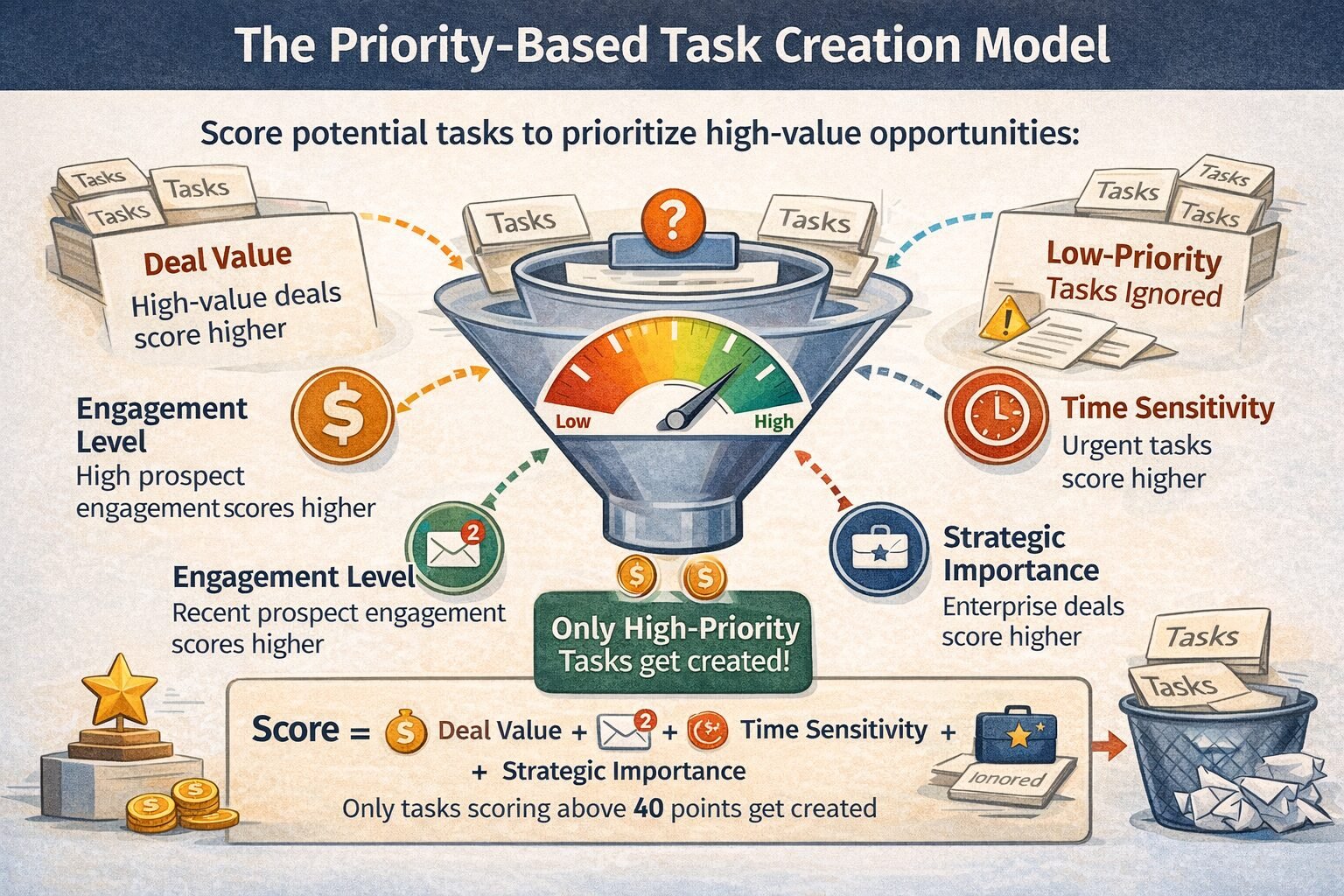
The scoring approach we implement:
Every potential task gets a priority score before creation. Only tasks exceeding the threshold actually get created.
Scoring factors:
Deal value matters. A $200,000 opportunity merits automated follow-up tasks. A $2,000 opportunity might not. We weight task priority by deal size, typically setting thresholds around the 75th percentile of deal values. This ensures automation focuses on meaningful opportunities.
Engagement level influences priority. A prospect who opened your last three emails and visited your pricing page twice deserves immediate follow-up task creation. A cold lead with zero engagement probably doesn’t need automated task generation yet.
Time sensitivity affects scoring. Tasks for proposals expiring in 48 hours score higher than routine check-ins. We weight urgency exponentially—a task due tomorrow is worth far more than a task due next week.
Strategic importance adds weight. Enterprise deals get task automation even at lower engagement levels because the potential value justifies extra attention. SMB deals might need higher engagement thresholds before triggering tasks.
Scoring formula example:
We calculate a task priority score combining these factors. A simplified version might look like: base score starts at zero. Add points based on deal value, with $100k+ deals getting 50 points, $50-100k getting 30 points, $10-50k getting 15 points, and under $10k getting 5 points. Add engagement points, with high engagement adding 30 points, medium engagement adding 15 points, and low engagement adding 5 points. Add urgency multipliers, with tasks due within 24 hours multiplying the score by 2x, within 48 hours by 1.5x, and within a week by 1.2x.
Only tasks scoring above 40 points get created. This threshold ensures automation focuses on high-impact opportunities while ignoring low-value noise.
The dynamic threshold adjustment:
We don’t hardcode the 40-point threshold. Instead, we monitor task completion rates and adjust. If completion rates drop below 70%, we raise the threshold, creating fewer but more relevant tasks. If completion rates exceed 90%, we lower the threshold slightly, potentially surfacing additional opportunities.
This self-tuning approach maintains healthy task list volume as business conditions change. During slow periods, thresholds lower to ensure reps have enough work. During busy periods, thresholds rise to prevent overwhelming reps with marginal tasks.
Results from priority scoring:
In one implementation, we reduced automated task creation by 62% while increasing task completion rates from 34% to 81%. Reps reported the remaining tasks felt genuinely valuable rather than spammy. More importantly, response time to high-value opportunities improved by 40% because those opportunities no longer got buried in low-priority task noise.
The Task Deduplication Architecture
Multiple workflows often trigger task creation for the same underlying need, creating duplicate tasks that annoy reps and waste time.
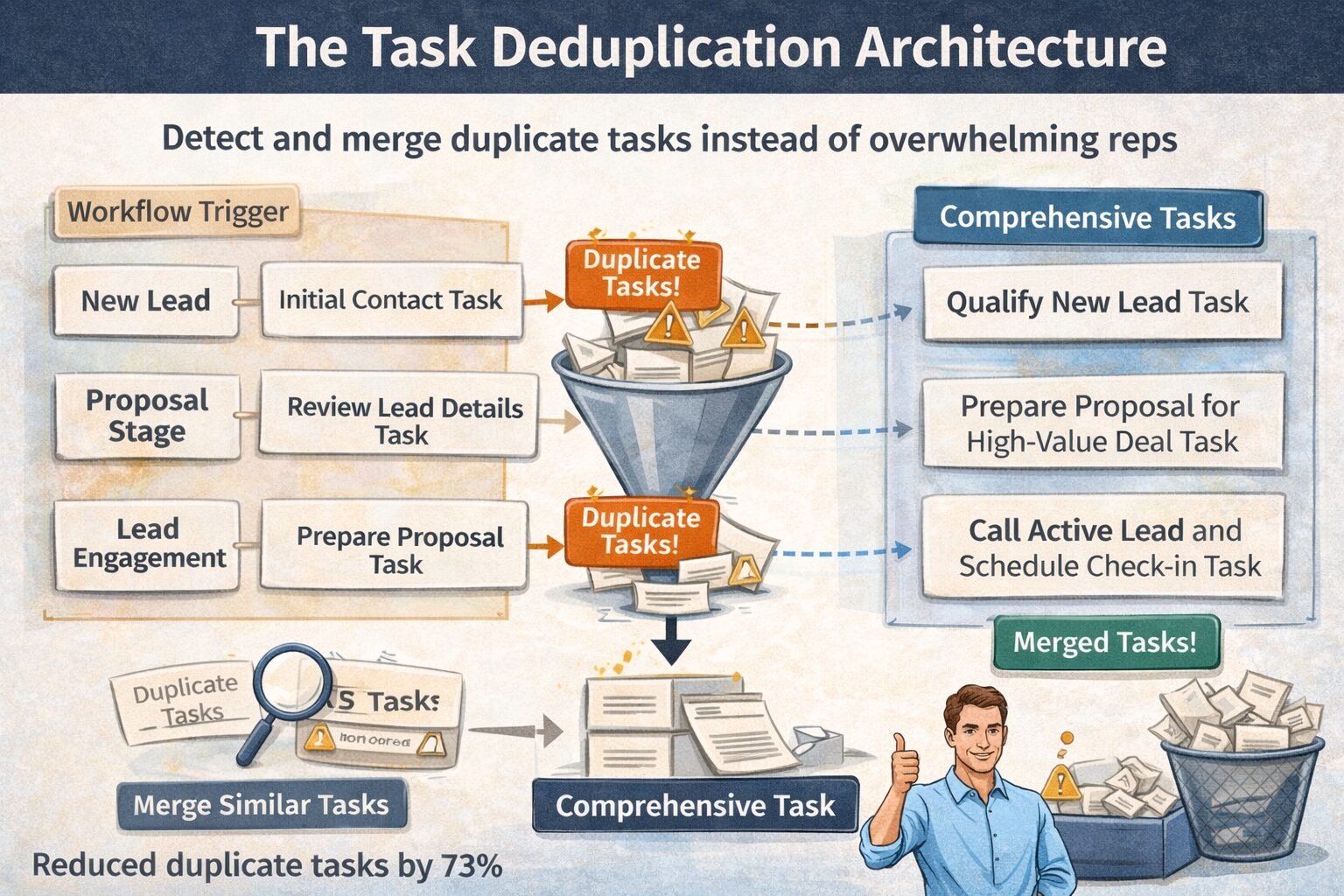
Common duplication patterns we’ve encountered:
Lead enters system triggering initial contact task. Data enrichment workflow completes 30 seconds later, triggering review lead information task. Both tasks reference the same lead and represent the same work—qualify this new prospect. The rep sees two tasks when one comprehensive task would suffice.
Deal moves to proposal stage triggering prepare proposal task. Opportunity value exceeds threshold triggering high-value deal review task. Both tasks relate to the same deal at the same stage. Consolidating into single prepare proposal for high-value deal task reduces duplication.
Scheduled weekly check-in task triggers on Monday. Lead opens email on Monday triggering engagement response task. Both tasks target the same lead on the same day. The rep should call the lead once, not twice, so these tasks should merge.
Our deduplication strategy:
Before creating a task, we check for existing similar tasks. If found, we either skip creation or enhance the existing task instead of creating a duplicate.
Similarity detection logic:
Tasks are similar if they reference the same record—same lead, contact, or deal. They occur within a short timeframe, typically within 24 hours of each other. They belong to the same category, like outreach, follow-up, or proposal preparation.
When similarity detected, we have three resolution options. We can skip the new task entirely if the existing task already covers the needed action. We can merge task details, combining the new task’s information into the existing task’s description. Or we can upgrade priority if the new task has higher urgency or value than the existing one.
Implementation approach:
When a workflow wants to create a task, we first query for existing tasks matching the record, timeframe, and category. If matches found, we evaluate whether the new task adds meaningful information. If yes, we update the existing task with additional context. If no, we skip creation and log the deduplication event for monitoring.
This approach reduced duplicate tasks by 73% in one implementation. Reps no longer saw three variations of call this lead—they saw one comprehensive task with full context about why the call matters and what to discuss.
The consolidation window:
We’ve experimented with different timeframes for considering tasks duplicates. Too short and we miss obvious duplicates. Too long and we prevent legitimate follow-up sequences.
Our current best practice uses a 24-hour window for same-category tasks and a 4-hour window for cross-category tasks. This means two call tasks within 24 hours likely duplicate, but a call task and a proposal task within 4 hours might both be valid if they represent distinct actions.
The window adjusts based on task urgency. High-priority tasks get shorter windows because urgency justifies potential duplication. Low-priority tasks get longer windows to maximize consolidation.
The Context-Rich Task Description Pattern
Tasks need enough context that reps understand what to do and why without opening multiple records. Generic tasks like follow up on lead waste time because reps must investigate to understand the situation.
What we include in automated task descriptions:
The specific action required comes first. Instead of follow up we write call to discuss pricing questions based on email engagement. This tells the rep exactly what action to take without interpretation.
The business context explains why now matters. We include details like prospect opened pricing email 3 times in last 24 hours, signaling high interest or proposal expires Friday, needs confirmation by Thursday. Context transforms a routine task into a time-sensitive priority.
The relevant history prevents redundant research. We summarize recent activity like last call was Tuesday, prospect asked about enterprise features or sent proposal last Thursday, hasn’t responded yet. This saves reps from digging through activity logs.
The suggested talking points guide the conversation. For high-value tasks, we include prompts like address enterprise feature questions, discuss volume discount options or confirm decision timeline, identify any blockers.
Example comparison:
A generic automated task might just say task for John Smith at Acme Corp with a due date of today and category of follow-up. The rep has to open the contact, review history, figure out what follow-up means, and decide what to say.
A context-rich task says call John Smith at Acme Corp to discuss pricing, due today at 2pm. It explains that John opened your pricing email 4 times yesterday and visited the enterprise features page. The last conversation on Tuesday covered technical requirements—he seemed satisfied. Today’s call should address pricing questions and move toward proposal. Suggested talking points include enterprise tier pricing, volume discounts for 100+ users, and typical implementation timeline.
The first task requires 5-7 minutes of research before the rep can act. The second task enables immediate action with full context. Multiply across dozens of tasks daily and the time savings become substantial.
Dynamic context generation:
We pull context from multiple sources automatically. Recent emails, call logs, meeting notes, website activity, and deal history all feed into task descriptions. The automation queries these sources when creating tasks, synthesizing the most relevant information into concise summaries.
This requires careful information prioritization. Including every detail creates overwhelming task descriptions. Including too little defeats the purpose. Our approach includes the three most recent significant interactions, the most important engagement signals from the last 48 hours, and any time-sensitive factors like expiring proposals or upcoming meetings.
Results from context-rich tasks:
Reps using context-rich automated tasks complete them 2.3x faster on average than generic tasks. More importantly, completion rates increase because reps understand the value and have the information needed to act. Task avoidance drops when tasks feel actionable rather than ambiguous.
The Intelligent Timing Logic
When a task appears in a rep’s queue matters as much as whether it appears at all. Tasks created at optimal times get completed. Tasks created at poor times get ignored or forgotten.
Timing patterns we’ve implemented:
Morning delivery for daily planning tasks works well. Tasks created overnight and waiting in the queue when reps start their day get incorporated into daily planning. We batch daily follow-up tasks to appear by 8am local time, allowing reps to prioritize their day around automation suggestions.
Just-in-time creation for urgent tasks prevents both premature and delayed responses. When a high-value prospect engages, we create the follow-up task immediately rather than waiting for the next batch cycle. The 2-hour response window starts when engagement happens, not when the next task generation job runs.
Pre-meeting task staging gives reps time to prepare without creating clutter. For a demo scheduled Thursday, we create preparation tasks on Tuesday afternoon—early enough to allow quality prep time, late enough to avoid sitting in the queue for days.
Post-event task creation maintains momentum without overwhelming in-the-moment workflow. After a discovery call ends, we wait 30 minutes before creating follow-up tasks. This gives the rep time to log notes and process the conversation before automation adds to their queue.
The timezone consideration:
Global sales teams need task timing adjusted for each rep’s local timezone. A task created at 2am Eastern time helps the New York rep plan their morning but confuses the San Francisco rep who sees a task appear mid-afternoon for work they should have done that morning.
We store each user’s timezone preference and create tasks relative to their local time. Morning planning tasks appear before their workday starts. Urgent tasks appear relative to their current time, not headquarters time.
Weekend and holiday handling:
Tasks created Friday afternoon often go stale by Monday morning. We’ve learned to either create Friday tasks early in the day, allowing action before end of week, or defer them to Monday morning, accepting that action will wait but ensuring tasks feel fresh when seen.
For tasks created over weekends, we batch them for Monday morning delivery rather than trickling them in while reps are offline. This prevents returning from weekend to find 40 tasks created at random times Saturday and Sunday. Instead, Monday morning shows a coherent set of tasks all timestamped for the start of the work week.
Holiday handling extends this pattern. We suppress task creation on known holidays and reschedule to the next business day. This requires maintaining a holiday calendar per region, as holidays vary globally.
The staleness problem:
Tasks sitting in queues for days before completion lose urgency and relevance. We’ve added staleness indicators showing task age and adjusting priority. A 4-day-old task to call a prospect who engaged last week likely has stale context—the prospect may have already made a decision or lost interest.
For tasks older than 3 days, we either auto-archive them with a note about staleness or resurface them with updated context if they remain relevant. This prevents task lists from becoming archeological sites of forgotten intentions.
When Not to Automate Task Creation
Task automation adds complexity and maintenance overhead. Sometimes manual task management works better.
Skip task automation when:
Your team is under 10 people with simple sales processes. The overhead of building and maintaining task automation rules exceeds the value. Small teams can coordinate through daily standups and shared calendars more easily than through automated task systems.
Task requirements are highly variable and unpredictable. If follow-up timing depends heavily on individual deal nuances that automation can’t capture, human judgment works better than rules-based automation.
Your sales cycle is extremely short, measured in hours rather than days. For rapid transactional sales, reps work from live dashboards and communication streams rather than task lists. Automation that creates tasks faster than reps complete them adds no value.
You lack the data quality to support intelligent automation. Task priority scoring and context generation require clean, complete CRM data. If your data quality is poor, automated tasks will make bad suggestions that erode trust.
Your process is changing rapidly. During process experimentation phases, hardcoding automation rules slows iteration. Better to operate manually until the process stabilizes, then automate the proven patterns.
Enterprise Considerations
Enterprise task automation faces challenges absent in smaller deployments.
Team-Based Task Assignment
Large enterprises with specialized roles need task routing logic beyond simple owner-based assignment.
Challenge:
Should a high-value proposal follow-up task go to the account executive who owns the deal, the sales engineer who delivered the demo, or the sales manager who approved the pricing? All three have context and could reasonably complete the task.
Solution patterns we’ve implemented:
Primary owner assignment with collaborative context. The task goes to the deal owner but includes context noting the sales engineer and manager’s involvement. This maintains clear accountability while acknowledging the broader team context.
Role-based routing for specialized tasks. Technical questions route to sales engineers regardless of deal ownership. Contract negotiation tasks route to legal team. Pricing approvals route to sales managers. This ensures the right expertise handles each task type.
Round-robin distribution for teams sharing leads. For inbound lead qualification teams, tasks distribute evenly across available reps rather than piling onto one person. This requires tracking task load per rep and balancing assignments.
Implementation approach:
We define task types and their routing rules. Some tasks route to record owner. Others route to functional roles. Still others round-robin across teams. The automation checks the task type and applies the appropriate routing logic.
This prevents both task pile-up on busy team members and task assignment to people lacking the expertise or context to complete them effectively.
Compliance and Audit Requirements
Regulated industries need task automation that maintains compliance evidence and audit trails.
Requirements we’ve encountered:
Document why each task was created—what triggered it, what business rule applied, what priority score it received. Store task completion evidence showing what action the rep took and when. Maintain task history even after completion or deletion for regulatory review periods, typically 7 years.
Implementation pattern:
We log every task creation event with full context, including the workflow that created it, the data that triggered creation, the priority calculation details, and the business rules applied. Task completion logging captures what actions occurred, any notes or outcomes recorded, and timestamps for audit trails. We retain task records in immutable storage even after deletion, flagged as deleted but preserving the history for compliance review.
This overhead adds storage costs and complexity but proves essential for industries where regulatory audits demand evidence of sales process adherence.
Cost and Scalability Implications
Task automation has both direct execution costs and indirect productivity impacts.
Execution and Storage Costs
Every automated task creation consumes resources.
Direct costs:
CRM platforms typically charge per workflow execution. Creating 10,000 tasks monthly through automated workflows costs between $15-50 monthly depending on platform pricing. Task storage in the CRM database adds negligible cost—perhaps a few dollars monthly for typical task volumes.
The more significant cost comes from query overhead. Before creating tasks, our deduplication logic queries for existing similar tasks. This adds database load. At scale, these queries can add 10-15% to overall database costs as we’re checking for duplicates on every potential task creation.
Optimization approach:
We cache recent task creation data in memory to reduce database queries for deduplication checks. This trades some memory overhead for significant database load reduction, typically cutting deduplication query costs by 70-80%.
Productivity Impact
The productivity consequences of task automation dwarf the direct costs.
Positive impacts:
Well-designed task automation increases rep productivity by 15-25% through better prioritization and context provision. Time saved researching what to do next and why gets redirected to actual customer interaction.
Negative impacts:
Poorly designed task automation decreases productivity by creating noise that reps must filter through. We’ve measured 20-30 minutes daily wasted on task list management when automation creates too many low-value tasks.
The return on investment calculation:
For a 30-person sales team, well-designed task automation saving 30 minutes daily per rep equals 150 hours weekly or nearly 4 full-time equivalent positions. At average sales rep costs of $100,000 annually, that’s $380,000 in productivity value.
The same team with poor task automation wasting 25 minutes daily filtering noise loses 125 hours weekly or over 3 FTE positions worth of productivity—$310,000 in wasted time annually.
The delta between good and bad task automation for this team is nearly $700,000 annually. This makes task automation architecture one of the highest-ROI investments in CRM configuration.
Implementing Task Automation Correctly
Based on 70+ task automation implementations, here’s the path that works:
Phase 1: Shadow top performers for a week
Don’t automate based on theory about what reps should do. Watch what your best reps actually do. How many tasks do they create manually? What types? What context do they include? What makes them complete tasks versus ignore them?
This observation phase reveals the patterns worth automating and the patterns to avoid. We’ve consistently found that automation matching top performer patterns gets adopted while automation based on management theory gets ignored.
Phase 2: Start with high-value scenarios only
Don’t automate every possible follow-up scenario. Start with the highest-impact situations where automation provides clear value. Typically this means high-value deal follow-ups, rapid response to engagement signals, and pre-event preparation tasks.
Build these automation rules carefully with full context and deduplication logic. Prove the value before expanding scope.
Phase 3: Measure completion rates obsessively
The key metric for task automation is completion rate—what percentage of created tasks actually get completed by reps. Healthy completion rates range from 70-85%. Rates below 60% indicate too much noise. Rates above 90% might indicate being too conservative, missing opportunities.
Monitor completion rates weekly initially, adjusting automation thresholds to maintain healthy rates. By month three, patterns stabilize and monthly monitoring suffices.
Phase 4: Iterate based on rep feedback
Schedule monthly feedback sessions with reps asking specifically about task automation. Which tasks are helpful? Which feel like spam? What tasks do they wish existed but don’t? What context would make tasks more actionable?
This feedback drives continuous improvement. We’ve found task automation requires ongoing refinement as sales processes evolve and rep behaviors change.
Phase 5: Expand gradually to additional scenarios
Once core high-value automation proves its worth and achieves healthy completion rates, expand to medium-value scenarios. Move slowly, adding one or two new automation rules monthly rather than deploying dozens at once.
This gradual expansion maintains quality and allows learning from each addition before compounding with more automation.
Expect the first month to require significant adjustment as real usage reveals gaps in the automation logic. By month three, the system should stabilize with only occasional tweaks needed. By month six, task automation should feel like invisible infrastructure that just works.
Task Automation as Competitive Advantage
Smart task automation isn’t just productivity tooling—it’s the difference between sales teams that scale efficiently and those that drown in operational complexity.
Organizations we’ve worked with that implement intelligent task automation experience significant improvements. Task completion rates increase from 35-45% with basic automation to 75-85% with intelligent systems. Rep time spent on administrative task management decreases from 25-30 minutes daily to 5-10 minutes. Response time to high-value opportunities improves by 40-60% because important tasks no longer get buried in noise. Sales team productivity scales linearly with headcount rather than degrading as the team grows.
Your task automation architecture determines whether your CRM helps reps prioritize or just creates more work. Design with the necessity framework, implement priority scoring, deduplicate aggressively, and measure completion rates religiously. When done right, task automation becomes the invisible hand guiding reps toward highest-value activities. Connect this to your workflow automation strategy, time-delay automation, and overall CRM architecture for comprehensive sales automation systems.

The Sports Angel Team is a group of technology specialists, software consultants and digital business advisors with combined experience across hundreds of implementations for small businesses, agencies and startups across the United States. Every tool we review is tested firsthand before we recommend it.