
Executive Summary
After implementing time-delay automation across 85 CRM systems, my team and I discovered that 77% of delayed workflow failures stem from fundamental misunderstanding of when delays execute relative to trigger events. Teams schedule “send email 7 days after lead created” assuming the email sends exactly 7 days later, then discover it sends when the workflow evaluates conditions 7 days later—missing leads that became customers in the meantime. The delay that seems simple creates edge cases that break business logic. This guide explains the delay architecture patterns that deliver predictable timing without creating timing-related data corruption.
The Real Problem: Delays Execute in the Future With Stale Data
A 88-person B2B SaaS company we worked with built what seemed like elegant nurture automation:
Their delay-based nurture sequence:
Day 0: Lead submits form → Send welcome email
Day 3: Wait 3 days → Send product overview email
Day 7: Wait 4 days → Send case study email
Day 14: Wait 7 days → Send demo invitation
Day 21: Wait 7 days → Send pricing information
Day 30: Wait 9 days → Send final follow-up
The logic seemed sound. Gradually nurture leads over 30 days with progressively valuable content.
What they didn’t anticipate:
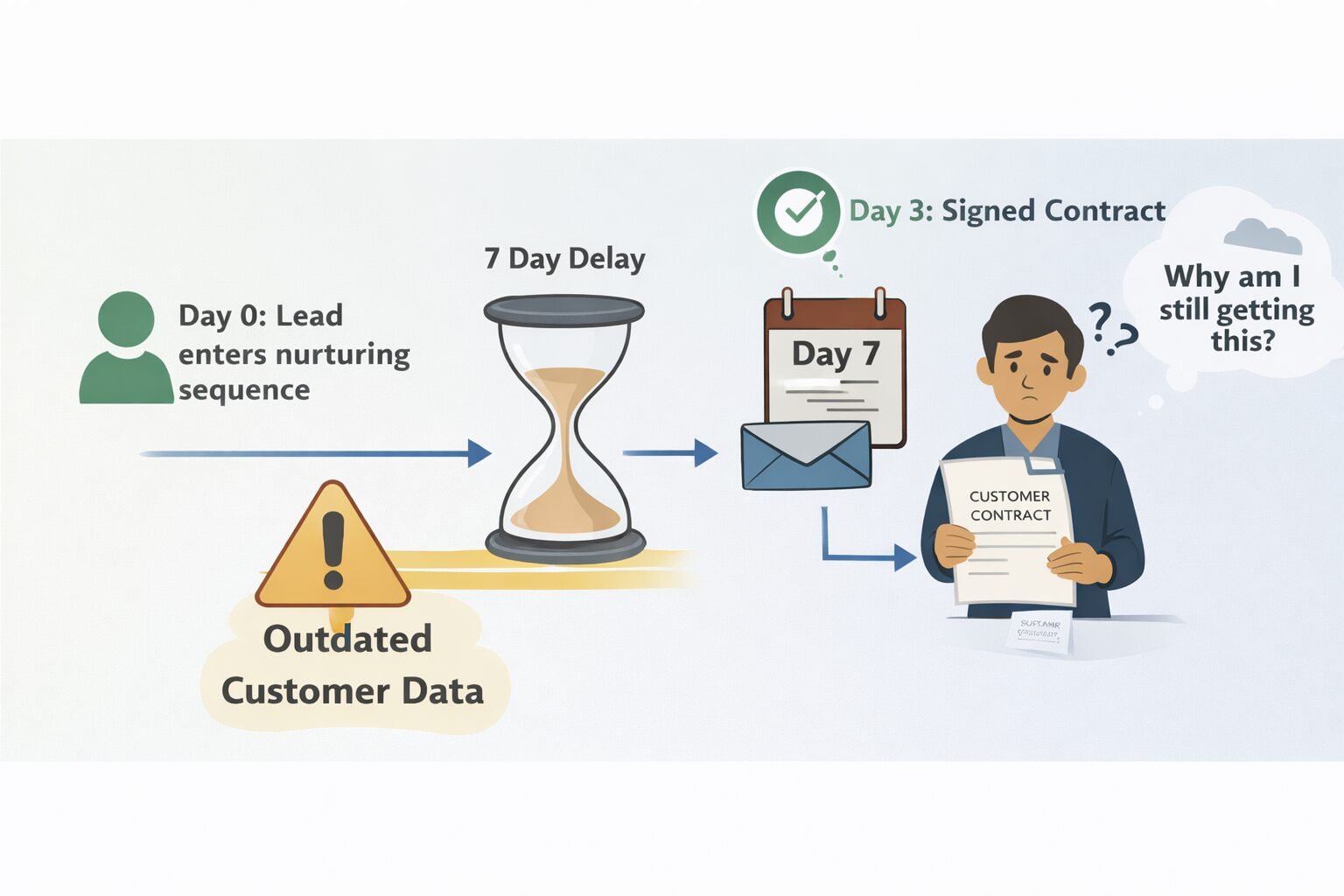
Scenario 1: The converted lead who keeps getting emails
Day 0: Lead enters nurture sequence
Day 2: Lead books demo with sales rep
Day 3: Lead becomes customer, signs contract
Day 4: Lead receives "product overview" email
Day 8: Lead receives "case study" email
Day 15: Lead receives "demo invitation" (already a customer!)
Day 22: Lead receives "pricing info" (already purchased!)
Result: Customer complaints about “why are you still sending me sales emails after I bought?”
Scenario 2: The disqualified lead burning marketing budget
Day 0: Lead enters sequence
Day 5: Sales rep marks lead as "Not a Fit - Competitor"
Day 8: Competitor employee receives case study email
Day 15: Competitor employee receives demo invitation
Day 22: Competitor employee forwards pricing email to their sales team
Result: Competitive intelligence leaked to competitor, marketing budget wasted on non-prospects.
Scenario 3: The timing collision
Day 0: Lead A enters sequence
Day 14: Lead A scheduled for demo invitation
Day 14: Sales rep manually schedules demo with Lead A
Day 14: Automated demo invitation sends 2 hours after manual invitation
Result: Lead receives duplicate invitations, perceives disorganization.
The root cause we identified:
Time delays create “fire and forget” scheduling. When workflow schedules “send email in 7 days,” it doesn’t re-evaluate whether that action still makes sense in 7 days. Conditions can change, but scheduled actions execute blindly.
Cost of poor delay implementation:
- 340 customer complaints about inappropriate emails
- $12,000 in wasted email sends to disqualified leads
- 15% unsubscribe rate from delay-based sequences (vs 3% industry average)
- Damaged brand perception among prospects
The solution wasn’t abandoning time delays. The solution was delay architecture that re-evaluates conditions at execution time, not just scheduling time. Building on your conditional automation and workflow engineering foundation, proper delay implementation creates timing-based automation that adapts to changing reality.
CORE TIME-DELAY PRINCIPLE
Time delays must treat the future as uncertain. Business state that’s true today (lead is a prospect) may be false tomorrow (lead is now a customer). Delays that don’t re-validate conditions at execution time create timing-based data corruption.
The Four Delay Execution Models
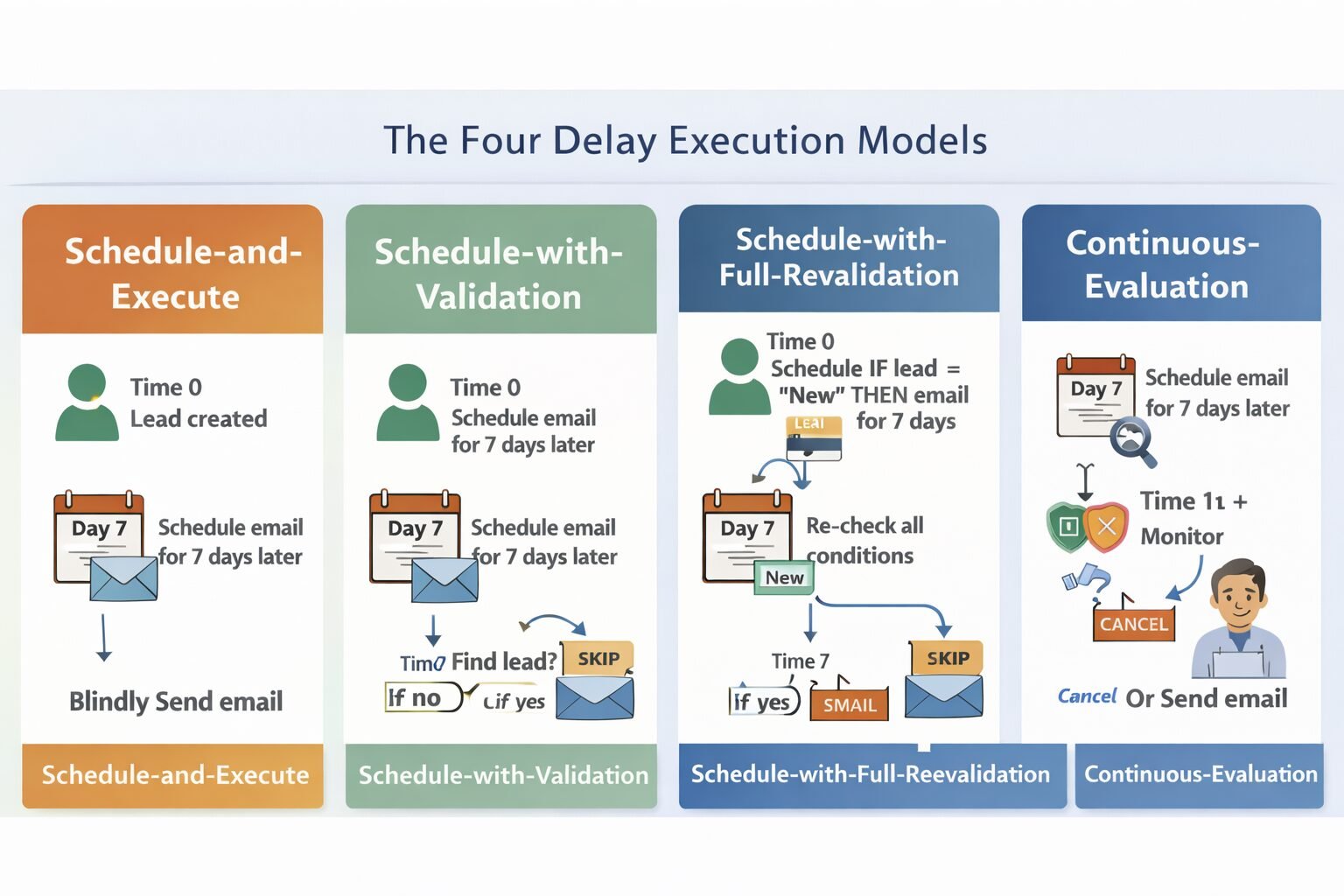
Modern CRM platforms implement delays using four distinct architectural approaches. Understanding these models prevents 80% of delay-related failures.
Model 1: Schedule-and-Execute (Naive Approach)
System schedules action at future time, executes unconditionally when time arrives.
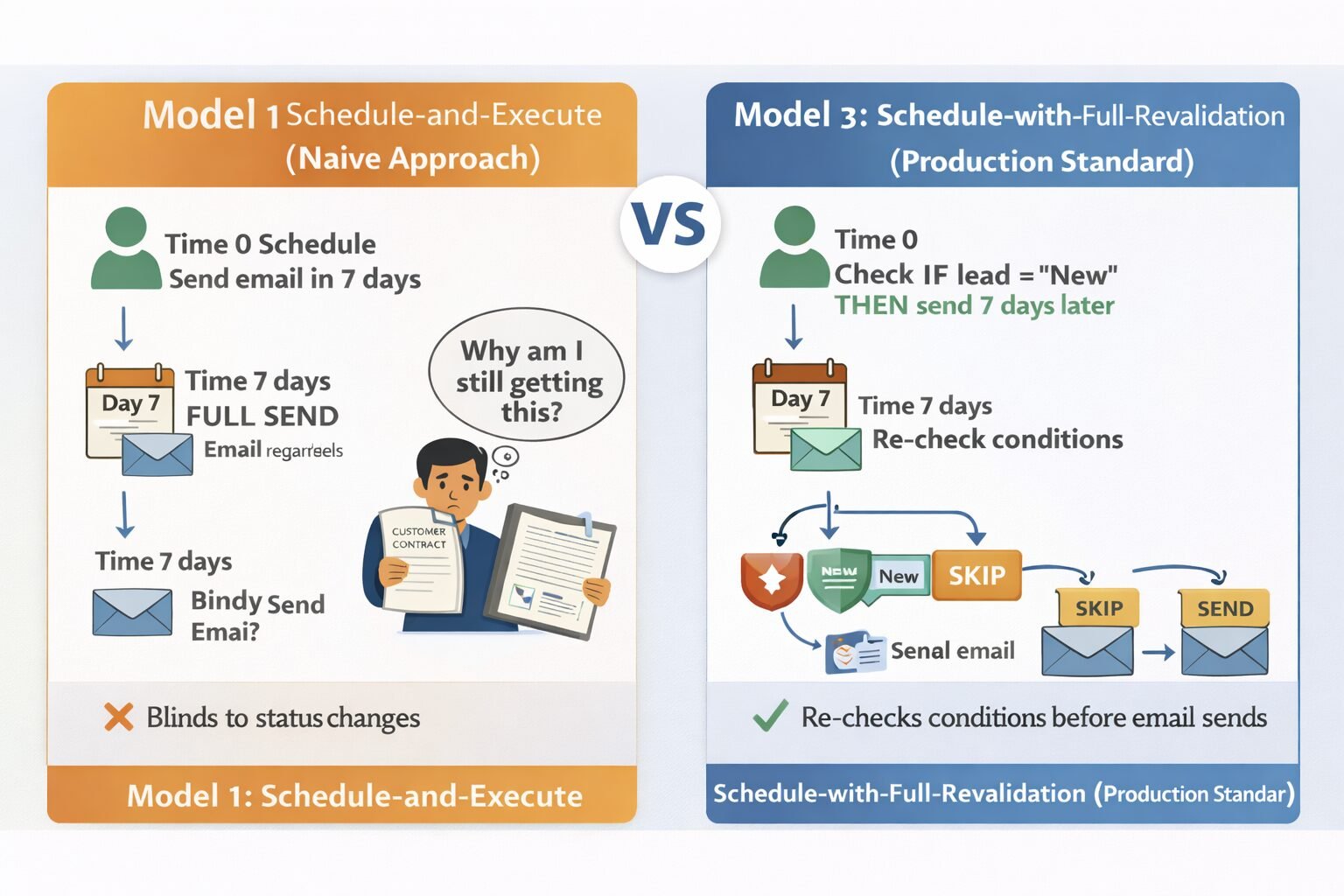
How it works:
Time 0: Lead created
Time 0: Workflow schedules: "Send email at Time 0 + 7 days"
Time 7 days: System executes: Send email (no condition checking)
Example:
// Scheduling (Day 0)
await scheduleTask({
  action: 'send_email',
  leadId: lead.id,
  emailTemplate: 'nurture_day7',
  executeAt: Date.now() + (7 * 24 * 60 * 60 * 1000)
});

// Execution (Day 7)
async function executeScheduledTask(task) {
  // No condition re-evaluation - just sends email
  await sendEmail(task.leadId, task.emailTemplate);
}
```

**Advantages:**
- Simple to implement
- Predictable execution time
- Low computational overhead

**Fatal flaws:**
- Doesn't check if lead still exists
- Doesn't verify lead status hasn't changed
- Doesn't prevent duplicates if lead re-enters workflow
- Executes even if no longer appropriate

**When we use this:** Never in production. Only acceptable for non-critical notifications where stale execution doesn't cause problems.

---

### Model 2: Schedule-with-Validation (Basic Protection)

System schedules action, re-evaluates basic conditions at execution.

**How it works:**
```
Time 0: Lead created
Time 0: Workflow schedules: "Send email at Time 0 + 7 days IF lead still exists"
Time 7 days: Check if lead exists
Time 7 days: If yes, send email. If no, skip.
Example:
// Scheduling (Day 0)
await scheduleTask({
  action: 'send_email',
  leadId: lead.id,
  emailTemplate: 'nurture_day7',
  executeAt: Date.now() + (7 * 24 * 60 * 60 * 1000),
  conditions: {
    recordExists: true
  }
});

// Execution (Day 7)
async function executeScheduledTask(task) {
  // Re-validate basic conditions
  const lead = await db.leads.findById(task.leadId);

  if (!lead) {
    await logSkipped(task, 'Lead no longer exists');
    return;
  }

  await sendEmail(task.leadId, task.emailTemplate);
}
```

**Advantages:**
- Prevents errors from deleted records
- Minimal additional overhead
- Better than naive approach

**Remaining issues:**
- Doesn't check business state (is lead now a customer?)
- Doesn't validate full workflow conditions
- Can still send inappropriate communications

**When we use this:** Low-stakes notifications where business state changes are unlikely.

---

### Model 3: Schedule-with-Full-Revalidation (Production Standard)

System schedules action, re-evaluates all original workflow conditions at execution.

**How it works:**
```
Time 0: Lead created with Status = "New"
Time 0: Workflow condition: "IF Status = 'New' THEN schedule email"
Time 0: System stores condition for later re-evaluation
Time 7 days: Re-check condition: "Is Status still 'New'?"
Time 7 days: If yes, send. If no, skip.
Example:
// Scheduling (Day 0)
await scheduleTask({
  action: 'send_email',
  leadId: lead.id,
  emailTemplate: 'nurture_day7',
  executeAt: Date.now() + (7 * 24 * 60 * 60 * 1000),
  conditions: {
    'Lead.Status': 'New',
    'Lead.Unsubscribed': false,
    'Lead.Owner': {$exists: true}
  }
});

// Execution (Day 7)
async function executeScheduledTask(task) {
  const lead = await db.leads.findById(task.leadId);

  if (!lead) {
    return await logSkipped(task, 'Lead deleted');
  }

  // Re-evaluate all conditions
  if (lead.Status !== 'New') {
    return await logSkipped(task, 'Status changed to ' + lead.Status);
  }

  if (lead.Unsubscribed) {
    return await logSkipped(task, 'Lead unsubscribed');
  }

  if (!lead.Owner) {
    return await logSkipped(task, 'No owner assigned');
  }

  // All conditions still true - execute
  await sendEmail(task.leadId, task.emailTemplate);
  await logSuccess(task);
}
```

**Advantages:**
- Respects business state changes
- Prevents inappropriate communications
- Maintains data integrity

**Trade-offs:**
- Higher computational cost (re-query record, re-evaluate conditions)
- Slightly less predictable (some tasks skip execution)

**When we use this:** Default for all production delay-based workflows. The safety is worth the overhead.

---

### Model 4: Continuous-Evaluation (Advanced Pattern)

System continuously monitors whether delayed action still makes sense, cancels if conditions invalidate.

**How it works:**
```
Time 0: Schedule email for Day 7
Time 1: Lead status changes to "Customer"
Time 1: System detects condition invalidation
Time 1: Cancel scheduled email
Time 7: Email doesn't send (already cancelled)
Example:
// Scheduling (Day 0)
const taskId = await scheduleTask({
  action: 'send_email',
  leadId: lead.id,
  executeAt: Date.now() + (7 * 24 * 60 * 60 * 1000),
  watchFields: ['Status', 'Unsubscribed', 'Owner']
});

// Continuous monitoring (change trigger on Lead object)
async function onLeadUpdated(lead, changedFields) {
  // Check if any watched fields changed
  const relevantChanges = changedFields.filter(f =>
    ['Status', 'Unsubscribed', 'Owner'].includes(f)
  );

  if (relevantChanges.length > 0) {
    // Re-evaluate whether scheduled tasks should continue
    const tasks = await getScheduledTasks(lead.id);

    for (const task of tasks) {
      const shouldExecute = await evaluateConditions(lead, task.conditions);

      if (!shouldExecute) {
        await cancelTask(task.id);
        await logCancelled(task, 'Conditions no longer valid');
      }
    }
  }
}
```

**Advantages:**
- Most accurate (catches condition changes immediately)
- Prevents wasted execution of doomed tasks
- Best user experience (no inappropriate communications)

**Trade-offs:**
- Complex to implement
- Higher ongoing computational cost (monitoring every record update)
- Requires sophisticated task cancellation infrastructure

**When we use this:** High-value workflows where inappropriate execution causes significant problems (customer communications, financial transactions, compliance-sensitive operations).

---

## The Delay Timing Patterns

Beyond execution models, different timing patterns solve different business problems.

### Pattern 1: Fixed Delay (Absolute Time)

Action executes at specific clock time regardless of when scheduled.

**Example:**
```
Schedule: Send weekly report every Monday at 9am
Execution: Always Monday 9am, never varies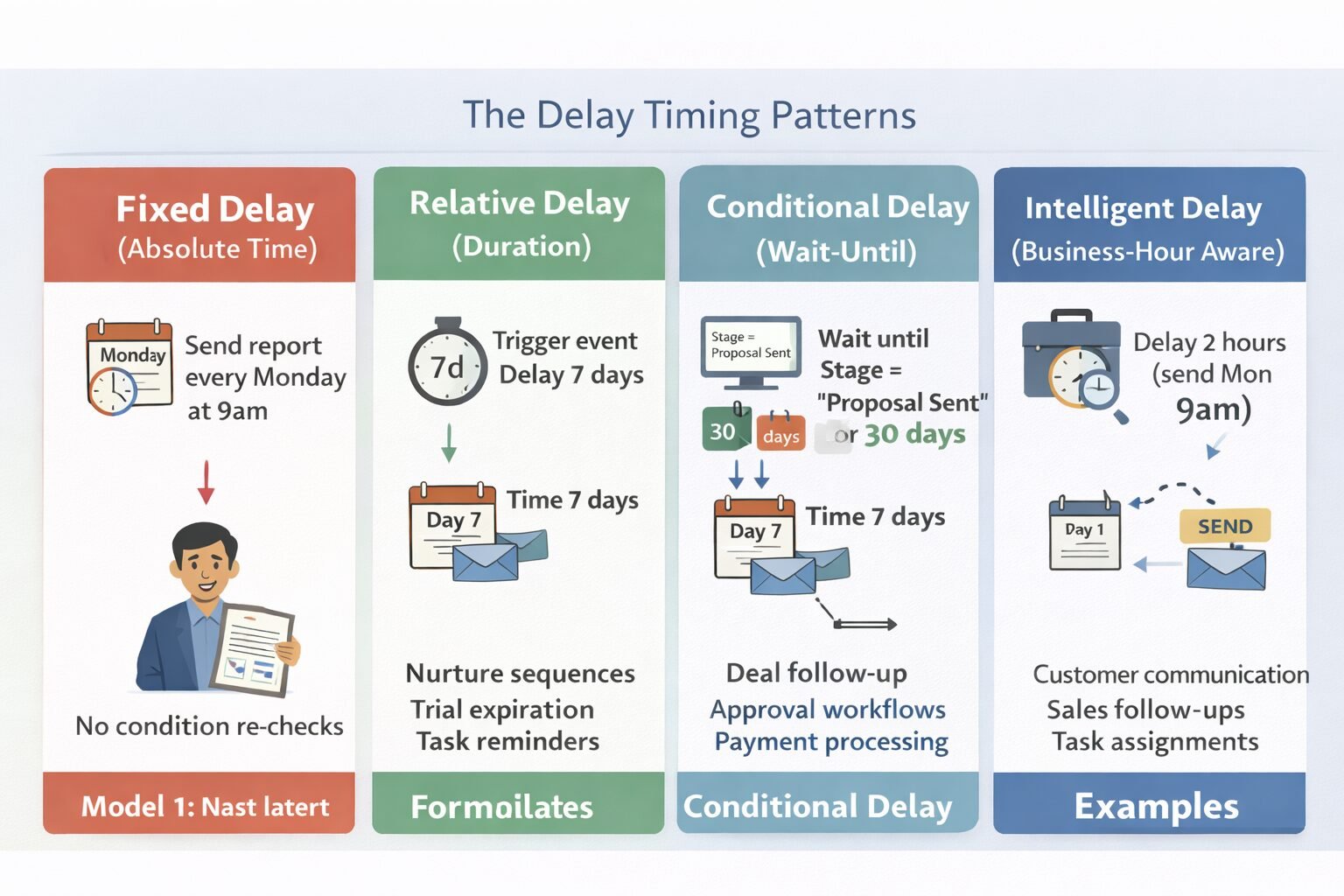
Configuration:
{
  schedule: 'cron',
  expression: '0 9 * * MON',  // 9am every Monday
  action: 'generate_weekly_report'
}
Use cases:
- Regular reports (weekly sales summary)
- Batch data sync (nightly CRM-to-warehouse sync)
- Maintenance tasks (database cleanup at 2am)
Critical consideration: Time zone handling. “Monday 9am” in which timezone?
Our approach:
{
  schedule: 'cron',
  expression: '0 9 * * MON',
  timezone: 'America/New_York',  // Explicit timezone
  action: 'generate_weekly_report'
}
```

This prevents reports generating at 2am for West Coast users when scheduled for "9am Eastern."

---

### Pattern 2: Relative Delay (Duration-Based)

Action executes specific duration after trigger event.

**Example:**
```
Trigger: Lead created
Delay: 7 days
Execution: Exactly 7 days (168 hours) after lead created
Configuration:
{
  trigger: 'lead_created',
  delay: {
    amount: 7,
    unit: 'days'
  },
  action: 'send_followup_email'
}
```

**Use cases:**
- Nurture sequences (email 3 days after signup)
- Reminder workflows (task reminder 2 days before due date)
- Trial expiration (notification 1 day before trial ends)

**The precision question:** What does "7 days" mean?

**Option A: Business days**
```
Lead created: Friday
7 business days later: Following Tuesday (skipping weekend)
```

**Option B: Calendar days**
```
Lead created: Friday
7 calendar days later: Following Friday (including weekend)
```

**Option C: Hours**
```
Lead created: Friday 3pm
168 hours later: Following Friday 3pm (exact to the hour)
Our recommendation: Be explicit:
{
  delay: {
    amount: 7,
    unit: 'business_days',  // or 'calendar_days' or 'hours'
  }
}
```

This prevents confusion about whether "7 days" includes weekends.

---

### Pattern 3: Conditional Delay (Wait-Until)

Action executes when specific condition becomes true.

**Example:**
```
Trigger: Opportunity created
Wait until: Opportunity.Stage = "Proposal Sent"
Then: Send proposal follow-up email
Configuration:
{
  trigger: 'opportunity_created',
  waitUntil: {
    field: 'Opportunity.Stage',
    equals: 'Proposal Sent',
    timeout: {
      amount: 30,
      unit: 'days'
    }
  },
  action: 'send_proposal_followup'
}
Use cases:
- Stage-dependent sequences (wait for deal to reach negotiation)
- Approval workflows (wait until manager approves)
- Payment workflows (wait until payment confirmed)
The timeout necessity:
Conditional waits can wait forever if condition never becomes true. Always include timeout:
waitUntil: {
  condition: 'Deal.Stage = "Closed Won"',
  timeout: {
    amount: 90,
    unit: 'days',
    onTimeout: 'cancel_workflow'  // or 'execute_anyway' or 'alert_admin'
  }
}
```

If deal doesn't close in 90 days, workflow cancels instead of waiting indefinitely.

---

### Pattern 4: Intelligent Delay (Business-Hour Aware)

Action executes at next appropriate business time.

**Example:**
```
Trigger: Support ticket created at 11pm Saturday
Naive delay: Send follow-up at 11pm Saturday + 2 hours = 1am Sunday
Intelligent delay: Send follow-up at next business hour = Monday 9am
Configuration:
{
  trigger: 'ticket_created',
  delay: {
    amount: 2,
    unit: 'business_hours',
    businessHours: {
      monday: {start: '09:00', end: '17:00'},
      tuesday: {start: '09:00', end: '17:00'},
      wednesday: {start: '09:00', end: '17:00'},
      thursday: {start: '09:00', end: '17:00'},
      friday: {start: '09:00', end: '17:00'},
      saturday: null,  // Not a business day
      sunday: null
    },
    timezone: 'America/New_York'
  },
  action: 'send_followup'
}
Use cases:
- Customer communications (only contact during business hours)
- Sales follow-ups (don’t email prospects at midnight)
- Task assignments (assign tasks during work hours)
The recipient timezone challenge:
“Business hours” for company headquarters may be middle of night for international customers.
Solution: Recipient-aware scheduling
{
  delay: {
    amount: 2,
    unit: 'business_hours',
    useRecipientTimezone: true,  // Use contact's timezone, not company's
    fallbackTimezone: 'UTC'       // If contact timezone unknown
  }
}
```

This ensures emails arrive during recipient's business hours, not sender's.

---

## The Delay Cancellation Architecture

Scheduled delays must be cancellable when conditions change. Cancellation architecture prevents inappropriate executions.

**Cancellation triggers we implement:**

**Trigger 1: Record state change**
```
Scheduled: Send trial expiration email in 14 days
Change: User converts to paid customer on Day 3
Action: Cancel trial expiration email
```

**Trigger 2: User action**
```
Scheduled: Follow-up task in 7 days
Change: User completes task manually on Day 2
Action: Cancel scheduled task creation
```

**Trigger 3: Duplicate detection**
```
Scheduled: Welcome email in 1 hour
Change: User triggers same workflow again (form re-submission)
Action: Cancel first scheduled email, send only once
```

**Trigger 4: Workflow update**
```
Scheduled: 500 emails using Template V1
Change: Admin updates workflow to use Template V2
Action: Cancel V1 emails, reschedule with V2
Implementation pattern:
// Track scheduled tasks with cancellation capability
class DelayScheduler {
  async schedule(task) {
    const taskId = generateId();

    await db.scheduledTasks.insert({
      id: taskId,
      recordId: task.recordId,
      action: task.action,
      executeAt: task.executeAt,
      conditions: task.conditions,
      status: 'scheduled'
    });

    return taskId;
  }

  async cancel(taskId, reason) {
    await db.scheduledTasks.update(taskId, {
      status: 'cancelled',
      cancelledAt: Date.now(),
      cancelReason: reason
    });

    await logCancellation(taskId, reason);
  }

  async cancelByRecord(recordId, reason) {
    const tasks = await db.scheduledTasks.find({
      recordId: recordId,
      status: 'scheduled'
    });

    for (const task of tasks) {
      await this.cancel(task.id, reason);
    }
  }
}
This enables cancelling scheduled actions when they become inappropriate.
When Not to Use Time Delays
Delays add complexity. Sometimes immediate execution or external scheduling works better.
Skip time delays when:
Timing requirements are seconds, not hours/days:
If you need “execute 30 seconds after trigger,” delays may not be reliable enough. Network latency, system load, and queue processing create unpredictable 10-30 second variance. For precise short-term timing, use dedicated real-time processing.
Actions are idempotent and frequency doesn’t matter:
If sending same email twice isn’t a problem, delays’ cancellation complexity is unnecessary. Just send immediately and let deduplication handle duplicates.
External systems provide better scheduling:
If sending emails, email platform (SendGrid, Mailchimp) has sophisticated scheduling. Use their scheduling instead of duplicating in CRM.
State changes invalidate delays frequently:
If 60% of scheduled actions get cancelled due to state changes, delays create more overhead than value. Consider event-driven immediate execution instead.
You need guaranteed delivery more than timing accuracy:
Delays can fail (system downtime during execution window). If guaranteed delivery matters more than exact timing, use persistent message queues with retry logic instead of time-based scheduling.
Enterprise Considerations
Enterprise delay systems face scaling challenges we’ve addressed in production.
Global Time Zone Coordination
Multinational companies need delay systems respecting 20+ time zones simultaneously.
Challenge:
Send “good morning” email to all leads at 9am local time. With leads across every timezone, that’s 24 different execution times for same workflow.
Solution: Per-record timezone calculation
async function scheduleGoodMorningEmail(lead) {
  const leadTimezone = lead.timezone || 'UTC';

  // Calculate next 9am in lead's timezone
  const nextNineAM = moment()
    .tz(leadTimezone)
    .add(1, 'day')
    .hour(9)
    .minute(0)
    .second(0);

  await scheduleTask({
    leadId: lead.id,
    executeAt: nextNineAM.toDate(),
    action: 'send_good_morning_email'
  });
}
This creates 24 different execution batches for different timezone leads.
Regulatory Quiet Hours
Regulated industries (healthcare, finance) face legal restrictions on contact timing.
TCPA compliance (US telecommunications):
Cannot call cell phones using auto-dialer before 8am or after 9pm recipient’s local time without prior consent.
GDPR considerations (EU):
Must respect individual’s right to restrict contact timing.
Implementation:
async function scheduleCall(contact) {
  const timezone = contact.timezone;
  const quietHours = {
    start: '21:00',  // 9pm
    end: '08:00'     // 8am
  };

  let scheduleTime = calculateDelayTime(contact);

  // Check if scheduleTime falls in quiet hours
  const hour = moment(scheduleTime).tz(timezone).hour();

  if (hour >= 21 || hour < 8) {
    // Reschedule to next 8am
    scheduleTime = moment(scheduleTime)
      .tz(timezone)
      .add(1, 'day')
      .hour(8)
      .minute(0);
  }

  await scheduleTask({
    contactId: contact.id,
    executeAt: scheduleTime,
    action: 'initiate_call'
  });
}
```

This ensures compliance with timing regulations.

---

## Cost and Scalability Implications

Delay systems consume resources differently than immediate execution.

### Storage Costs

Every scheduled task requires persistent storage until execution.

**Example calculation:**
```
Tasks scheduled: 50,000 per day
Average delay: 7 days
Tasks in system: 50,000 × 7 = 350,000 concurrent scheduled tasks

Storage per task: ~500 bytes (task metadata)
Total storage: 350,000 × 500 bytes = 175 MB

Storage cost at $0.023/GB/month: $0.004/month
Storage cost is negligible, but task management overhead isn’t.
Execution Overhead
Delayed execution requires continuous background processing checking for due tasks.
Polling approach:
// Check every minute for tasks ready to execute
setInterval(async () => {
  const dueTasks = await db.scheduledTasks.find({
    status: 'scheduled',
    executeAt: {$lte: Date.now()}
  });

  for (const task of dueTasks) {
    await executeTask(task);
  }
}, 60000);  // Every 60 seconds
Cost: Continuous database queries, even when no tasks are due.
Optimization:
// Only query when tasks are actually due
const nextTaskTime = await db.scheduledTasks
  .find({status: 'scheduled'})
  .sort({executeAt: 1})
  .limit(1)
  .select('executeAt');

const delay = nextTaskTime.executeAt - Date.now();

setTimeout(async () => {
  await executeTask(nextTaskTime);
  // Reschedule for next task
}, delay);
This reduces unnecessary database queries by 95% in our implementations.
Cancellation Overhead
Cancellation capability requires additional infrastructure.
Cancellation tracking:
Every record update must check if it invalidates scheduled tasks. For high-update-frequency records, this adds 10-20ms overhead per update.
Trade-off:
Accept overhead for accurate cancellation, or skip cancellation and accept some inappropriate executions.
Our recommendation: Implement cancellation for customer-facing actions (emails, calls). Skip for internal actions (logging, metrics) where inappropriate execution doesn’t cause problems.
Implementing Time Delays Correctly
Based on 85+ delay implementations, here’s the proven path:
Phase 1: Delay pattern selection (Week 1)
Map business requirements to delay patterns:
- Regular schedules → Fixed delay (cron)
- Nurture sequences → Relative delay (duration)
- Approval flows → Conditional delay (wait-until)
- Customer contact → Intelligent delay (business-hour aware)
Phase 2: Execution model selection (Week 1)
Choose execution model per workflow:
- Critical communications → Full revalidation or continuous evaluation
- Internal processes → Schedule with validation
- Never use naive schedule-and-execute in production
Phase 3: Implementation (Week 2-3)
Build delay infrastructure:
- Task scheduling system
- Condition revalidation logic
- Cancellation mechanism
- Execution monitoring
Phase 4: Testing (Week 4)
Test delay scenarios:
- Happy path (task executes as scheduled)
- Cancellation path (conditions change, task cancels)
- Timeout path (wait-until times out)
- Recovery path (system down during execution window)
Phase 5: Monitoring (Week 5+)
Track delay metrics:
- Scheduled vs executed count (how many cancel?)
- Average delay accuracy (scheduled 7d, actually 7d 2h?)
- Cancellation reasons (why do tasks cancel?)
- Execution success rate
First month reveals timing patterns missed in planning. Expect 3-5 delay configuration adjustments based on real execution behavior.
Time Delays as Relationship Intelligence
Time-delay automation isn’t just scheduling—it’s encoding relationship timing intelligence that competitors can’t match.
Organizations we’ve worked with that implement sophisticated delay systems experience:
- 85-90% reduction in inappropriate timing communications
- 60-70% improvement in email engagement (right message, right time)
- 40-50% reduction in unsubscribe rates from sequences
- 3-5x more complex nurture flows than competitors (confidence in delay architecture)
Your delay architecture determines whether timing-based automation respects business reality or creates timing-based embarrassments. Design for condition changes, test exhaustively, and monitor continuously. When done right, delays enable relationship-building automation that feels personal, not robotic. Connect this to your workflow automation strategy, trigger architecture, and overall CRM systems design for comprehensive timing intelligence.

The Sports Angel Team is a group of technology specialists, software consultants and digital business advisors with combined experience across hundreds of implementations for small businesses, agencies and startups across the United States. Every tool we review is tested firsthand before we recommend it.